For entrepreneurs exploring Become a POS Reseller, the revenue math is more compelling than most realize. The point-of-sale industry is a multi-billion dollar market, and POS resellers sit at the center of it. If you're a payment agent, ISO, IT consultant, or entrepreneur looking for a recurring revenue business, POS reselling offers one of the most attractive models in B2B technology sales.
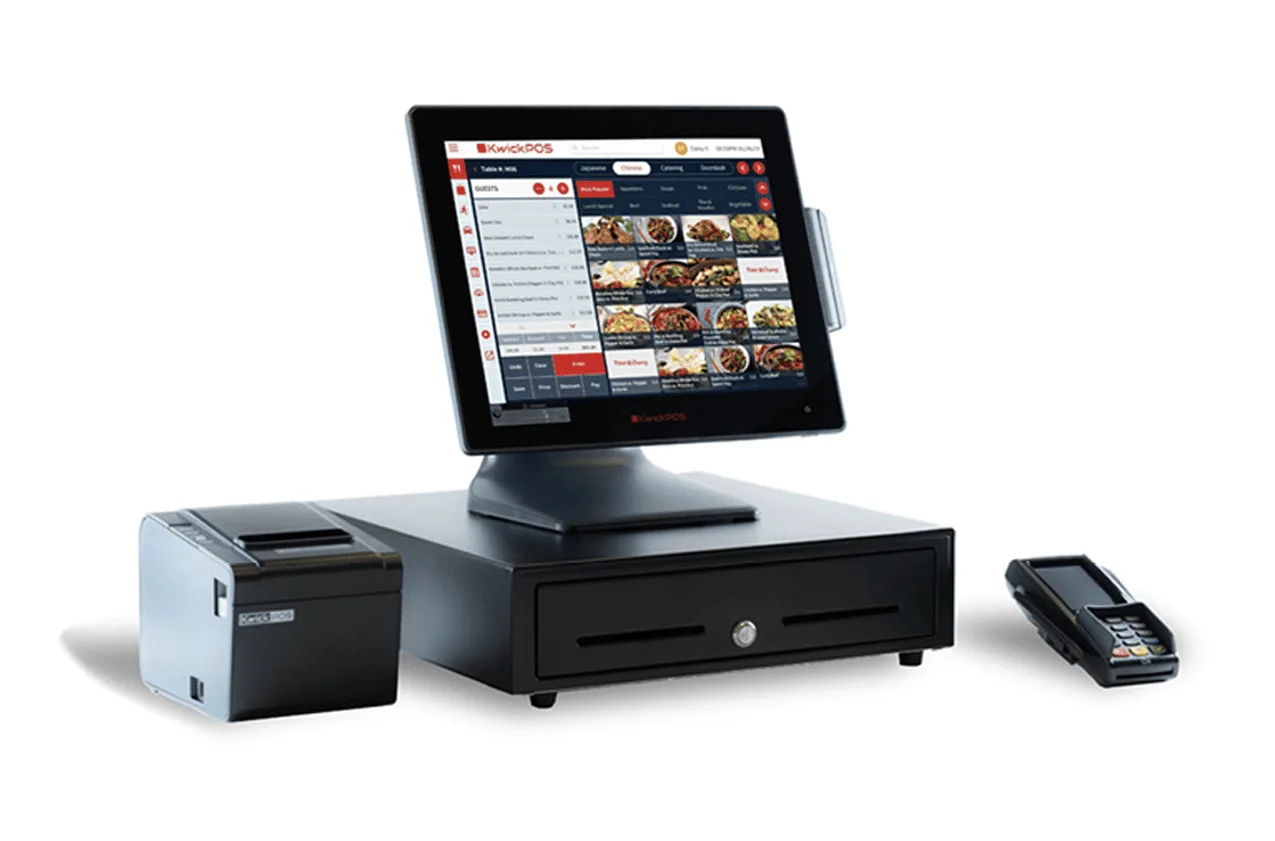
KwickOS partner demo kit — everything you need to close deals
This guide covers everything you need to know: how the business model works, how to choose the right POS partner, how to find and close merchants, and how to build a sustainable portfolio that generates monthly income for years to come.
What Is a POS Reseller?
A POS reseller (also called a POS dealer, agent, or value-added reseller) sells point-of-sale systems to businesses — restaurants, retail stores, salons, and other merchants. Unlike direct sales by the POS company itself, resellers act as independent intermediaries who earn revenue through a combination of hardware sales, software subscriptions, and payment processing residuals.
Think of it like being a real estate agent, but for business technology. You match merchants with the right POS solution, handle the relationship, and earn ongoing income from every deal you close.
The Revenue Model: How POS Resellers Make Money
POS reselling has multiple revenue streams, which is what makes it so attractive compared to other sales roles:
1. Hardware Sales (One-Time)
When you sell a POS system, there's usually a hardware component: terminals, tablets, receipt printers, cash drawers, kitchen display screens, kiosks. The margin on hardware varies but typically ranges from $200 to $2,000 per installation, depending on the complexity of the setup.
2. Software Subscription Residuals (Monthly)
Most modern POS systems charge a monthly software subscription. As a reseller, you often earn a percentage of this subscription — typically 10-30% — for the lifetime of the account. A merchant paying $150/month in software generates $15-45/month in residuals for you.
3. Payment Processing Residuals (Monthly) — The Big One
This is where the real money lives. Every time a merchant swipes, taps, or dips a credit card, a small percentage goes to the processing chain. If you control the processing relationship, you earn a residual on every transaction — typically 0.05% to 0.15% of the transaction volume.
Let's do the math:
| Scenario | Monthly Card Volume | Your Residual (0.10%) | Annual Residual |
|---|---|---|---|
| Small coffee shop | $20,000 | $20/month | $240/year |
| Mid-size restaurant | $50,000 | $50/month | $600/year |
| Busy restaurant | $100,000 | $100/month | $1,200/year |
| Retail store | $80,000 | $80/month | $960/year |
Now multiply that by 50, 100, or 200 merchants. A reseller with 100 mid-size restaurant accounts earning $50/month each generates $5,000/month in recurring processing residuals alone — on top of hardware sales and software residuals.
The processing residual is the reason POS reselling creates generational wealth for some agents. It's recurring, it grows as your merchants grow, and it compounds as you add more accounts. But here's the catch: you only earn processing residuals if you control the processing relationship.
The Critical Question: Who Controls Processing?
This is the single most important factor in choosing a POS partner. It determines whether you build a real business or just earn commissions.
POS Companies That Control Processing
Toast, Square, and Clover all bundle payment processing with their POS software. When you sell these systems:
- The merchant must use the POS company's processing
- You earn a small referral fee or reduced residual
- The POS company can change your terms at any time
- Your merchants are locked in — they can't switch processors without switching POS
- Your book of business is effectively owned by the POS company, not you
Many resellers have been burned by this model. You spend months building a portfolio of merchants on Clover, then Fiserv changes the reseller terms and your residuals get cut. There's nothing you can do because the processing relationship belongs to them.
Processor-Agnostic POS (You Control Processing)
The alternative is a processor-agnostic POS system where the merchant uses YOUR processing. In this model:
- You place the merchant with any processor you choose
- You set the processing rates and earn the spread
- No POS company can change your processing terms
- Your merchants can switch POS software without losing their processing relationship
- You own the processing relationship permanently
KwickOS is built on this processor-agnostic model. The platform works with any payment processor — Fiserv, TSYS, Worldpay, or any independent ISO. Your merchants use your processing. You keep 100% of the processing revenue.
Build Your POS Reselling Business with KwickOS
Keep 100% of processing revenue. One platform for restaurants, retail, and beauty/spa. Free demo hardware kit for qualified partners.
Explore the Partner ProgramStep-by-Step: Starting Your POS Reselling Business
Step 1: Choose Your POS Partner
Evaluate potential POS partners on these criteria:
- Processing control: Can you bring your own processor? This is non-negotiable if you want to maximize revenue.
- Product breadth: Does the POS serve multiple verticals (restaurants, retail, salon)? A multi-vertical platform means you can sell to any merchant you meet, not just one type.
- Feature completeness: Is it truly all-in-one (POS, KDS, online ordering, signage, CRM)? Or will merchants need add-ons that complicate the sale?
- Partner support: Does the company provide training, marketing materials, and a dedicated partner manager?
- Demo hardware: Can you get a demo unit to show merchants the system live? A live demo closes 3x more than a slideshow.
- Track record: How many merchants are on the platform? How long has the company been around?
Step 2: Get Your Processing Relationship
If you don't already have a processing relationship, you'll need one. Options include:
- Register as an ISO/agent with a processor (Fiserv, TSYS, Worldpay, etc.)
- Partner with an existing ISO who can underwrite your merchants
- Use a processor marketplace that lets you place merchants quickly
Your POS partner may be able to recommend processing partners. Ask during the evaluation process.
Step 3: Learn the Product Inside and Out
Before you sell a single system, spend time mastering the POS platform:
- Set up a complete demo environment with real menu items
- Practice the entire merchant flow: setup, menu configuration, order taking, payment, reporting
- Learn the administrative features: employee management, inventory, analytics
- Understand the installation process: hardware setup, network requirements, training time
Step 4: Define Your Target Market
Most successful resellers start with a niche:
- Cuisine type: Chinese restaurants, pizza shops, sushi bars
- Business type: Quick-service restaurants, full-service, retail, salons
- Geography: Focus on your local market before expanding
- Pain point: Merchants switching from Toast (processing lock-in), upgrading from legacy POS, or opening new locations
Step 5: Find Merchants
Your merchant pipeline is everything. Here are proven channels:
- Door-to-door: Still the most effective method in the POS industry. Walk into restaurants and retail stores with your demo unit.
- Referrals: Every happy merchant knows other business owners. Ask for introductions.
- Trade shows: Industry events like WSAA, NRA Show, and regional food expos are goldmines for leads.
- Online presence: Build a website, run Google Ads for "[city] POS system", post in local business groups.
- Restaurant supply companies: Partner with businesses that already sell to restaurants (equipment, food suppliers).
- Accountants and bookkeepers: They work with merchants daily and can refer clients who need better POS technology.
Step 6: Master the Demo
The live demo is your most powerful sales tool. Structure it around the merchant's pain points:
- Ask questions first: What POS are they using? What frustrates them? How much are they paying for processing?
- Show the relevant features: If it's a restaurant, show table management, KDS, online ordering. If retail, show inventory and barcode scanning.
- Address the processing angle: Show them how much they could save by choosing their own processor.
- Make it tangible: Let them touch the hardware, enter an order, see a receipt print.
- Close on the spot: Have paperwork ready. The longer they think about it, the less likely they close.
Step 7: Install and Support
A smooth installation creates a loyal customer and generates referrals. Plan for:
- Menu entry and configuration (offer to do this for the merchant)
- Hardware setup and network testing
- Staff training (keep it simple — focus on daily operations first)
- Go-live support (be on-site for the first day if possible)
- Follow-up within 48 hours to address any issues
Scaling Your Business: From 10 to 100+ Merchants
Build a Team
Once you reach 30-50 merchants, you'll find it difficult to sell new accounts and support existing ones. Hire your first sales rep and/or technician to handle installations while you focus on closing new deals.
Systematize Installation
Create a checklist and standard process for every installation. This lets you delegate installations to technicians without being personally involved in every one.
Leverage Multi-Location Merchants
A single merchant with 5 locations is worth as much as 5 separate deals but takes a fraction of the sales effort. Target multi-location operators and franchise groups.
Track Your Metrics
Monitor these numbers monthly:
- New merchant signups
- Monthly processing volume across your portfolio
- Processing residual income
- Software residual income
- Churn rate (merchants leaving)
- Average revenue per merchant
Common Mistakes to Avoid

- Selling a POS that controls processing: You're building someone else's business, not yours. Always maintain processing control.
- Not getting a demo unit: Selling from a slideshow or website demo is 3x less effective than a live demo on real hardware.
- Ignoring support: Merchants who have issues and can't reach you will churn. Budget time for support or hire someone.
- Trying to sell everyone: Focus on a niche first. A reseller who's the "Chinese restaurant POS expert" in their city will close more deals than a generalist.
- Not asking for referrals: Every happy merchant knows 5-10 other business owners. Ask after every successful installation.
Income Potential: Realistic Numbers
| Portfolio Size | Est. Monthly Processing Residuals | Est. Monthly Software Residuals | Total Monthly Recurring |
|---|---|---|---|
| 25 merchants | $1,250 | $500 | $1,750 |
| 50 merchants | $2,500 | $1,000 | $3,500 |
| 100 merchants | $5,000 | $2,000 | $7,000 |
| 200 merchants | $10,000 | $4,000 | $14,000 |
Based on average $50K/month processing volume per merchant and 0.10% residual. Actual results vary.

These numbers don't include one-time hardware revenue, which can add $500-2,000 per installation. A productive reseller closing 3-4 new merchants per month can reach 100 accounts within two years.
Getting Started Today
The POS reselling opportunity is real, but it's getting more competitive. The resellers who win are the ones who:
- Choose a processor-agnostic platform (so they keep processing control)
- Master the product and can demo it confidently
- Focus on a niche market and become the local expert
- Prioritize merchant support and referrals
- Think long-term — build a portfolio, not just close deals
If you're ready to explore POS reselling with a processor-agnostic platform, learn about the KwickOS Partner Program. We provide the technology, training, and demo hardware — you bring the hustle.
Ready to Start Your POS Reselling Business?
KwickOS partners keep 100% of processing revenue. Free demo kit available for qualified partners.
Apply for the Partner Program →