The restaurant technology market has been selling POS systems for 30 years. Toast, Square, Clover, Aloha, Micros — they all started as point-of-sale systems and have bolted on additional features through add-on modules and third-party integrations. The result is a Frankenstein architecture: a POS core surrounded by connected (but not integrated) tools that each have their own database, their own login, their own billing, and their own support contact. A restaurant running Toast POS + Toast Loyalty + Toast Online Ordering + DoorDash + 7shifts + a digital signage app is paying 6 vendors for 6 tools that partially overlap and frequently fail to sync. An operating system replaces all 6 with one platform.
KwickOS was built from the ground up as an operating system, not a POS with bolt-ons. POS, KDS, online ordering (KwickMenu), delivery (KwickDriver), loyalty, gift cards, CRM, digital signage (KwickSign), employee management with fingerprint authentication, and reporting — all are native functions of the same platform, sharing the same database, the same interface, and the same administration. This is the architecture that powers 5,000+ businesses processing $2M+ in daily sales across 50 states.
The 8 Functions Every Restaurant OS Must Include
1. POS and Checkout
The foundation — but connected to everything else. When a server enters an order, it simultaneously fires to the KDS, updates inventory, earns loyalty points, and appears in the reporting dashboard. No API delays, no sync failures.
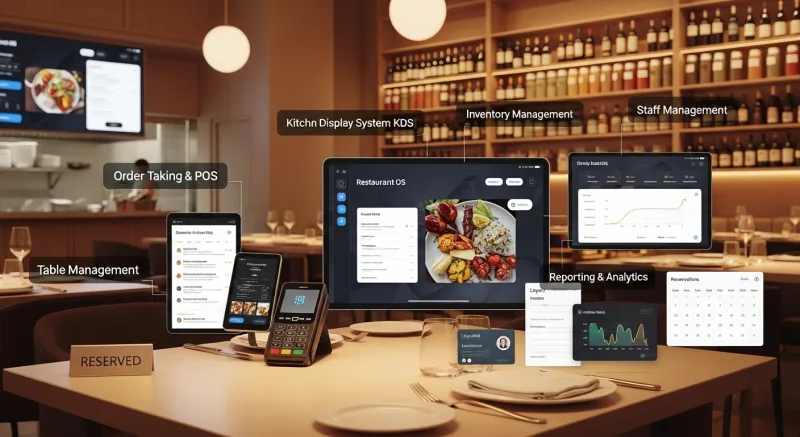
2. Kitchen Display System
Multi-station routing, course timing, and order tracking. Shogun Japanese Hibachi uses customized KDS displays for their hibachi stations. Crafty Crab uses it across 19 locations with 152 terminals. The KDS is not an add-on — it is a core function of the OS.
3. Online Ordering
KwickMenu provides online ordering with 500K monthly users already on the platform. Orders flow directly to the KDS alongside dine-in orders with identical priority and routing.
4. Delivery Management
KwickDriver at $2 flat + $6.99/5mi replaces DoorDash at 15-25% commission. For restaurants doing $8,000/month in delivery, the annual savings exceed $14,000.
5. Loyalty and CRM
Points, tiers, birthday rewards, gift cards, and customer profiles — all built in at $0 additional monthly cost. Toast charges $75/month for loyalty. Square charges $45/month. KwickOS includes it.
6. Employee Management
Scheduling, time tracking with fingerprint authentication (eliminating $4,800/year in buddy punching), and labor cost reporting as a percentage of revenue — all integrated.
7. Digital Signage
KwickSign updates menu boards, promotional displays, and customer-facing screens automatically from the POS menu database. No separate content management system needed.
8. Reporting and Analytics
One dashboard showing sales, labor, food cost, loyalty metrics, online ordering performance, and delivery economics. T. Jin China Diner uses real-time remote monitoring across 15 locations to make data-driven decisions from a single screen.
City-Specific Operating System Guides
Restaurant technology requirements vary by city due to labor costs, regulatory environment, competition density, and local food culture. Explore our city-specific guides:
- New York — 27,000+ Restaurants
- Los Angeles — 31,000+ Restaurants
- Chicago — 7,500+ Restaurants
- Houston — 11,000+ Restaurants
- Dallas — 10,000+ Restaurants
- Phoenix — 6,000+ Restaurants
- Philadelphia — 4,500+ Restaurants
- San Antonio — 5,000+ Restaurants
- San Diego — 8,000+ Restaurants
- San Francisco — 4,500+ Restaurants
The 6 KwickOS Differentiators
1. Processor-Agnostic. Merchants keep 100% of processing revenue. Choose any payment processor — save $5,000-15,000/year compared to Toast or Square's locked processing.
2. Hybrid Local+Cloud. 1ms local latency vs. 20ms cloud. Works offline when internet drops. No lost sales during outages.
3. Fingerprint 1:N/1:1. Employee verification prevents buddy punching ($4,800/year savings), unauthorized voids, and time theft. Toast and Square do not support fingerprint authentication.
4. Web-Based on Linux. No Windows license, no manual updates, runs on any hardware. Replaces proprietary $500-900 terminals with standard tablets.
5. Multi-Language. English, Chinese, Spanish built-in. Kitchen staff sees their language, customer-facing displays show theirs.
6. In-House Developed. Full control, rapid customization. Shogun got customized hibachi station displays. Crafty Crab got customized KDS for special requests. If you need something specific, the development team builds it.
Case Studies at Scale
Crafty Crab Seafood: 19 stores, 152 terminals. One-click menu sync, customized KDS, multi-location loyalty.
T. Jin China Diner: 15 stores, 75 terminals. Real-time remote monitoring, centralized management.
Haidilao Hot Pot: 600+ locations worldwide. Enterprise-scale deployment on KwickOS.
Rockin' Rolls Sushi Express: 3 stores, 49 iPad self-ordering stations. KDS integration reduced serving time.
Making the Switch
KwickOS onboarding: 7-10 days from purchase to installation, 1-3 hours install, 1-2 hours training. 24/7 multilingual US-based support. Call (888) 355-6996 or book a demo.
Replace Your POS With an Operating System
KwickOS includes POS, KDS, online ordering, delivery, loyalty, signage, scheduling, and reporting in one platform. Join 5,000+ businesses across 50 states.
Book Your Free DemoThe OS Advantage: Gift Cards, Loyalty & Points Built Into the Core
When your POS is a full operating system, gift cards and loyalty are not bolted-on modules — they are woven into every transaction. A customer pays with a gift card, earns loyalty points, and gets asked about their membership status, all in one seamless checkout flow that takes your cashier zero extra steps.
- Gift cards (physical + electronic) — issued, sold, tracked, and redeemed within the same interface as regular checkout
- Points system — points appear on every receipt, customers see their balance growing, redemption is one tap at payment
- Membership management — recurring billing, VIP pricing, member-only items, all controlled from the back office
- CRM connection — every gift card purchase, point earned, and membership interaction feeds into the customer profile for targeted marketing
This is what "operating system" means in practice. Not a POS with add-ons. A unified platform where every feature talks to every other feature. And none of it costs extra.