Your POS System Needs Offline Mode (And What Happens Without It... isn't just a technology decision — it's an operational one. It is 7:14 PM on a Friday night. Every table is full. The kitchen is firing on all cylinders. Your servers are moving at peak speed.
Then the internet drops.
Your cloud-based POS terminals freeze. Servers cannot enter orders. The kitchen display goes blank. Credit card payments fail. Your host is turning away a line of walk-ins because you cannot seat anyone new when you cannot ring anyone up.
Four hours later, your ISP restores service. But the damage is done: $2,400 in lost revenue, a kitchen full of prepped food that was never ordered, a staff that stood around earning wages while producing nothing, and a dining room full of customers who will think twice before coming back.
This is not a hypothetical scenario. It is happening to restaurants across America every single week.
And here is the part that should make you angry: it is entirely preventable.
The Cloud-Only Problem Nobody Talks About
Cloud POS systems have real advantages. Remote access, automatic updates, lower upfront costs. Every major POS vendor markets these benefits aggressively.
What they do not market is the single point of failure baked into every cloud-only architecture: your internet connection.
Think about what "cloud-based" actually means. Your menu lives on a server in Virginia or Oregon. Every time a server taps "large Pepperoni pizza," that request travels from your terminal, through your router, through your ISP, across the internet to a data center, gets processed, and the response travels all the way back. That round trip takes 15 to 25 milliseconds on a good connection.
Now think about how many things can go wrong on that journey.
Your router can fail. Your ISP can have an outage. A construction crew can cut a fiber line. A storm can knock out a cell tower. The cloud provider itself can go down — AWS has had major outages affecting thousands of businesses simultaneously.
And it is not just catastrophic failures. Even minor connectivity issues — a router that drops packets, a slow DNS server, a congested network during peak hours — can make a cloud POS sluggish, unresponsive, and frustrating for your staff.
How Often Does This Actually Happen?
More than you think. According to data from the Federal Communications Commission and industry reports:
- The average US business experiences 5 to 7 internet outages per year, ranging from minutes to hours.
- Cable internet (the most common for small businesses) has an average uptime of 99.5% — which sounds great until you realize that is 43 hours of downtime per year.
- Severe weather events cause an average of 8 hours of internet downtime per event in affected areas. Hurricanes, ice storms, and heat waves are the worst offenders.
- ISP maintenance windows often happen during off-peak hours (2 AM - 6 AM), but not always — and you are rarely notified in advance.
If your restaurant operates 12 hours a day, 365 days a year, and your internet has 99.5% uptime, you are looking at roughly 22 hours of POS downtime per year during business hours. At $600/hour in average sales, that is $13,200 in potential lost revenue annually — and that is the optimistic scenario.
What Actually Stops Working During an Outage
When your cloud POS loses its connection, the impact cascades through your entire operation. Here is what fails, system by system:
Order Entry and Kitchen Communication
On most cloud-only systems, the menu database is hosted remotely. When the connection drops, servers cannot pull up menu items, modifiers, or pricing. Even if the terminal has a cached version of the menu, new orders cannot route to the kitchen display system (KDS) if the routing logic runs through the cloud.
The result? Your kitchen goes blind. Servers resort to handwriting tickets — assuming they can still remember all the modifiers, prices, and special instructions that the POS normally handles.
Payment Processing
Credit card authorization always requires a live connection to the payment network. No internet means no card payments. Period. Some POS systems offer "store and forward" — accepting the card and queuing the authorization for later — but this carries risk. If a card is declined when the connection returns, you have already served the food and the customer has left.
Most cloud POS systems do not even attempt store-and-forward. They simply refuse to process payments during an outage.
Reporting and Inventory
Sales tracking stops. Inventory counts freeze. If you were running a promotion or limited-time offer, you have no visibility into how much stock remains. Labor tracking may continue on some systems, but without sales data, you cannot make staffing decisions.
Customer-Facing Systems
Online ordering stops accepting orders (or worse, accepts orders that never reach your kitchen). Self-service kiosks display errors. Digital menu boards may go blank if they pull content from the cloud. Loyalty program lookups fail.
In short: every system that makes your restaurant function as a modern operation goes offline simultaneously.
The Real Cost of Downtime (Beyond Lost Sales)
Lost revenue is the obvious cost. But it is not the only one — and it may not even be the largest.
- Food waste. Your kitchen has already prepped for the expected volume. If you lose two hours of dinner service, you are throwing away hundreds of dollars in perishable ingredients that cannot be used tomorrow.
- Labor cost. Your staff is on the clock whether they are serving customers or standing around. A 4-hour outage during a fully staffed dinner shift costs $400 to $800 in wasted labor, depending on your team size.
- Customer attrition. Research from the National Restaurant Association shows that 60% of diners who have a significantly negative experience will not return within 30 days — and 25% never return at all. If you turned away 40 customers during an outage, you may have lost 10 of them permanently.
- Reputation damage. In the age of Google reviews and social media, one bad Friday night experience becomes a public record. "Showed up and they couldn't take orders for an hour" is not the kind of review that attracts new customers.
- Comps and discounts. The customers who stay through the outage expect something for their trouble. Free desserts, discounted meals, and apologetic comps add up quickly.
When you add it all up, a single 4-hour outage during peak hours can cost a mid-size restaurant $3,500 to $5,000 in direct and indirect losses.
What "Offline Mode" Actually Means (And Why Most Versions Are Inadequate)
Several cloud POS vendors now advertise "offline mode" as a feature. But not all offline modes are created equal.
Here is what you will find:
Tier 1: No Offline Capability
The system simply stops working when internet drops. You get an error message and nothing else. This was standard for early cloud POS systems and some budget options still work this way.
Tier 2: Limited Offline Mode (What Most Vendors Offer)
The terminal caches a copy of the menu and can take orders locally. But kitchen routing may not work. Card payments definitely do not work. Reporting stops. And when the connection returns, syncing the offline orders back to the cloud can create duplicates, missing items, or reconciliation nightmares.
This is what Toast, Square, and most cloud POS systems offer. It is better than nothing — but it is a band-aid, not a solution.
Tier 3: True Hybrid Architecture (Local Server + Cloud Sync)
This is fundamentally different. Instead of running everything in the cloud and caching some data locally as a fallback, a hybrid system runs all core operations on a local server at your restaurant and uses the cloud for sync, backup, and remote access.
The difference is architectural, not just a feature toggle. Here is how it works:
- Menu, pricing, and modifier data lives on a local server in your restaurant. Response time: 1 millisecond, not 20.
- Order routing to kitchen displays happens over your local network. No internet required.
- Reporting and sales tracking runs locally in real time. You can pull reports even during an outage.
- Inventory management continues to track counts and deductions without interruption.
- Cloud sync happens continuously in the background when internet is available. If it drops, the local system keeps running. When it reconnects, everything syncs automatically — no duplicates, no missing orders, no reconciliation problems.
The internet connection becomes a nice-to-have, not a requirement. Your POS runs at full speed whether your ISP is up or down.
1ms vs. 20ms: Why Latency Matters Even When the Internet Is Working
Here is something most POS reviews never mention: even when your internet is working perfectly, a cloud-only system is inherently slower than a local one.
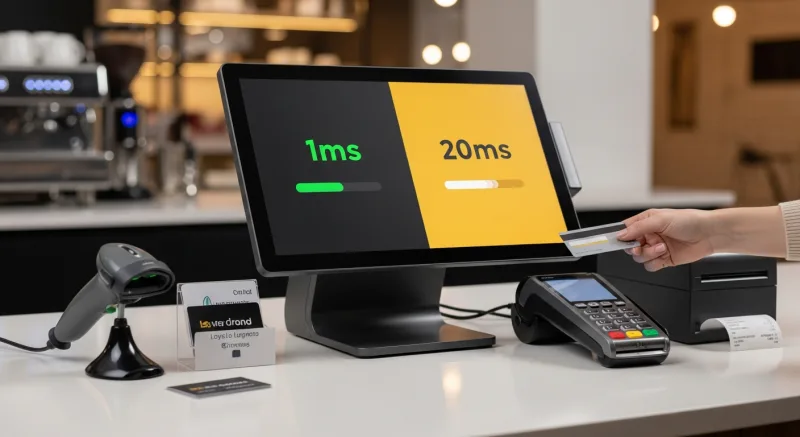
A local server responds in approximately 1 millisecond. A cloud server responds in 15 to 25 milliseconds — and that is under ideal conditions. During peak hours, with network congestion, that can climb to 50 to 100 milliseconds or more.
One hundred milliseconds does not sound like much. But multiply it by every interaction. Every menu item tap, every modifier selection, every payment step, every ticket print. A server entering a 4-item order with modifiers might trigger 15 to 20 round trips. On a cloud system, that is 1.5 to 2 seconds of accumulated latency. On a local system, it is 20 milliseconds — effectively instantaneous.
Over a busy dinner service with 200 orders, that latency difference adds up to 5 to 7 minutes of cumulative delay for your serving staff. That is not trivial when every minute counts during a rush.
Now think about a chain like T. Jin China Diner, operating 15 stores with 75 terminals. At scale, local processing is not just faster — it is essential for keeping kitchen operations synchronized across all those stations without bottlenecking on a single cloud connection.
Storm Season: The Annual Stress Test Your POS Was Not Built For
The vulnerability of cloud-only POS systems becomes most obvious during severe weather events. Hurricanes, ice storms, heat waves, and tropical storms do not just threaten your building — they threaten your internet infrastructure.
Consider what happens during a major storm:
- Internet goes down first — often hours before conditions actually prevent customers from coming in. You lose revenue during the pre-storm and post-storm periods when people are still dining out.
- Recovery is slow — after a hurricane, internet service is often the last utility restored. Power comes back (or you run a generator), but internet may be down for days.
- Demand spikes post-storm — restaurants are among the first businesses people visit after a weather event. If your POS is still waiting for internet while your competitor down the street is serving customers on a local system, you are losing recovery revenue.
Restaurants in hurricane-prone regions (Florida, the Gulf Coast, the Carolinas) can experience multiple multi-day internet outages per year. A cloud-only POS is not just inconvenient in these areas — it is a business continuity risk.
Crafty Crab's Multi-Location Challenge
Multi-location operations face an amplified version of this problem. Crafty Crab Seafood operates 19 stores with 152 terminals across multiple states. If their POS architecture required every terminal at every location to maintain a constant cloud connection, a single regional ISP outage could take down multiple restaurants simultaneously.
With a hybrid architecture, each location operates independently on its own local server. A menu update pushed from headquarters syncs to all 19 locations via the cloud — but once it arrives, each restaurant has the data locally. If one location loses internet, the other 18 keep running. If a regional outage hits three locations at once, all three continue operating on local servers while headquarters monitors the situation remotely (through the locations that still have connectivity).
This is not just about uptime. It is about operational independence at the store level, with centralized visibility when connectivity allows it.
How to Evaluate Offline Capabilities Before You Buy
If you are shopping for a POS system — or evaluating whether your current one puts you at risk — here are the specific questions to ask:
- Where does the menu database live? If the answer is "in the cloud" or "cached locally from the cloud," you have a potential single point of failure. The right answer is "on a local server with cloud sync."
- Can I take and route orders to the kitchen with no internet connection? Not "can I enter orders" — can the entire order flow, from server tablet to kitchen display, function without internet?
- What happens to my KDS during an outage? Kitchen display systems are mission-critical. If they go blank when internet drops, your kitchen stops functioning.
- How does payment processing work offline? Look for store-and-forward capability with automatic processing when the connection returns.
- How does data sync when connectivity returns? The system should handle this automatically without creating duplicate orders or requiring manual reconciliation.
- What is the latency for normal operations? Ask for actual response time measurements, not marketing claims. The difference between 1ms and 20ms is measurable and meaningful at scale.
- Is there a secondary internet failover option? Some systems can automatically switch to a cellular backup connection. This does not replace local processing, but it can maintain card payment capability during a primary ISP outage.
The Architecture That Actually Solves This
KwickOS is built on a hybrid local+cloud architecture. The local server at each restaurant runs the full operating system — POS, KDS, inventory, reporting, digital signage, and staff management — with 1ms response times. The cloud layer handles multi-location sync, remote monitoring, backups, and online ordering.
When internet is available, everything syncs in real time. When it is not, every local function continues without interruption. Your staff will not even notice the difference.
Because KwickOS runs on Linux with a web-based interface, the local server is a small, quiet, energy-efficient box that sits in your back office. No Windows licenses. No manual updates. No special hardware requirements. It runs on any standard x86 hardware, and the entire system can be installed in 1 to 3 hours.
For multi-location operators like T. Jin China Diner (15 stores, 75 terminals) and Crafty Crab Seafood (19 stores, 152 terminals), this architecture means each location is operationally independent while remaining centrally managed. Real-time remote monitoring shows every location's status, sales, and operational metrics — but each store can run autonomously for as long as needed.
The Bottom Line
Internet outages are not a question of "if" but "when." The average American business loses internet connectivity multiple times per year, and each outage can cost a restaurant thousands of dollars in lost revenue, wasted food, idle labor, and damaged reputation.
Cloud-only POS systems turn every internet outage into a business emergency. A hybrid local+cloud system turns it into a non-event.
The technology to solve this problem exists today. The question is whether your POS vendor has built their system around it — or whether they have built their system around the assumption that your internet will never fail.
Because it will. And when it does, you want a system that keeps running.
Never Lose Another Sale to an Internet Outage
KwickOS hybrid architecture keeps your restaurant running at full speed — online or offline. 1ms local response, automatic cloud sync, zero downtime.
Get a Demo