
 Tom Jin
You spent $14,000 on inventory last month. Your staff rang up 150 transactions a day. And at the end of the month, your average ticket was $32.
But here's what's quietly killing your margins: your customers are walking past $8 worth of products they would have bought — if those products had been in the right place at the right time.
That's $8 per customer. Times 150 customers per day. Times 30 days. That's $36,000 per month in revenue you're not collecting — not because customers don't want these items, but because your store layout never gave them the chance to say yes.
And that's not all: the products that drive impulse purchases are almost always your highest-margin items. We're talking 60% to 80% gross margins on accessories, add-ons, and consumables. The $8 you're leaving on the table isn't $8 in revenue — it's $5 to $6 in pure profit, per customer, every single day.
I've watched this pattern play out across 5,000+ businesses running on KwickOS. The stores that master impulse placement don't just see slightly better numbers. They see a fundamentally different business. This guide is the playbook.
The Psychology Behind Why Customers Buy Things They Didn't Plan To
Before you rearrange a single shelf, you need to understand what's happening inside your customer's brain when they make an impulse purchase. Because impulse buying isn't random. It's predictable. And once you understand the triggers, you can engineer them.

According to industry research, impulse purchases account for 40% to 80% of all retail transactions depending on the product category. That's not a rounding error — it's the majority of your revenue potential.
Here's the thing: impulse buying is driven by three psychological forces that stack on top of each other.
Force 1: Decision fatigue depletion. By the time a customer reaches your checkout counter, they've already made dozens of micro-decisions — what to buy, which brand, which size, what color. Their rational "do I really need this?" filter is exhausted. Small, low-cost items bypass that filter entirely.
Force 2: Commitment escalation. Once someone has decided to buy something, adding a small item to the purchase feels trivial. A $4 accessory added to a $45 purchase doesn't register as a separate decision — it's a rounding error on a commitment they've already made.
Force 3: Environmental triggers. Visual cues, physical proximity, and staff suggestions create urgency that didn't exist 30 seconds ago. A customer who walked past a display of phone chargers in aisle 3 without noticing will pick one up when it's right next to the register and the cashier says "Do you need a charger? These are our best sellers."
The stores that win at impulse sales don't rely on one of these forces. They layer all three. And the layer cake starts at the checkout counter.
The Checkout Zone: Your Highest-Revenue Square Footage
Let me put this in perspective. Your checkout counter area — roughly 20 to 30 square feet — generates more revenue per square foot than any other part of your store. Industry data consistently shows checkout zones producing 3 to 5 times the revenue per square foot of general floor space.
But it gets worse: most retail stores treat the checkout counter as dead space. A register. A card reader. Maybe a jar of pens. That's it.
Here's how to turn your checkout zone into a revenue engine:
The Decompression Funnel
Create a narrowing pathway leading to the register, lined on both sides with impulse-friendly products. Think of it as a gentle squeeze — customers walk through a curated aisle of low-cost items before they reach the cashier.
- Eye level, arm's reach: Products between 3 and 5 feet from the floor, within arm's reach without bending or stretching. This is prime real estate.
- Price range $1 to $15: Items in this range trigger the "why not?" response. Anything above $20 activates the rational decision filter you're trying to bypass.
- Themed clusters, not random piles: Group items by use case (travel accessories, snack bundles, seasonal gifts) rather than mixing unrelated products. Themes create a narrative that justifies the purchase.
- Refresh weekly: The same display for months becomes invisible. Rotate products and signage weekly to maintain the novelty trigger.
Baked Cravings runs a self-serve kiosk at Lego Land with a carefully designed checkout flow — every product within reach is an add-on candidate. Even in a kiosk environment with zero staff interaction, the placement alone drives incremental purchases.
The Customer-Facing Display Multiplier
Here's where technology amplifies physical placement. A customer-facing display on your POS terminal shows the order in progress — and alongside it, targeted add-on suggestions.
When a customer sees "Add a screen protector for $4.99?" right as they're about to tap their card, conversion rates on that suggestion jump significantly compared to a verbal-only upsell. The visual confirmation makes the add-on feel like part of the checkout process, not an interruption.
KwickOS customer-facing displays can be configured to show different promotions based on what's in the cart, the time of day, or the customer's loyalty tier. A member who's 50 points from their next reward sees a different prompt than a first-time visitor. More on that shortly.
Endcap Displays: The Silent Salespeople
Endcaps — the displays at the end of each aisle — are the second-highest-converting real estate in your store. They work because they interrupt the customer's path. You can't walk past an endcap without seeing it.
But most retailers waste endcaps on whatever the distributor paid them to display, or on clearance items they're trying to move. That's backwards. Endcaps should feature your highest-margin impulse products, not your lowest-margin overstock.
Here's the thing: endcap placement alone can increase a product's sales by 3 to 10 times compared to its regular shelf position. That's the same product, same price, same store — the only variable is location.
Endcap Rules That Work
- One theme per endcap. "Summer grilling essentials" outperforms a random assortment of discounted items. Themes tell a story. Stories sell.
- Pair a hero product with add-ons. Put a $29 item at the center and surround it with $3 to $8 accessories. The hero draws attention; the accessories drive margin.
- Limit choices to 3-5 SKUs. More than five products creates decision paralysis. Fewer creates a "curated collection" feeling that customers trust.
- Add signage with a number. "3 for $10" outperforms "33% off" because it feels like a deal and tells the customer exactly what to do. Numbers reduce friction.
- Rotate every 2 weeks. Track which endcap products sell best through your POS reports. Double down on winners, swap out underperformers. KwickOS real-time inventory tracking makes this a 5-minute task.
Cross-Merchandising: Selling Solutions, Not Products
Cross-merchandising is the practice of placing complementary products together, even if they come from different departments or categories. It's the reason grocery stores put marshmallows next to graham crackers next to chocolate bars — s'mores is a solution, not three separate products.
And that's not all: cross-merchandising works because it solves a problem the customer didn't know they had. They came in for the burger patties. They didn't think about buns, cheese, or charcoal until you placed all four together with a sign that said "Backyard Burger Kit — $24.99."
For retail stores, cross-merchandising opportunities are everywhere:
- Phone case + screen protector + charging cable near the electronics section
- Candle + matches + decorative tray near home goods
- Shampoo + conditioner + hair mask as a "complete care bundle"
- Gift bag + tissue paper + gift card near the checkout (more on gift cards in a moment)
The key is bundling. When you create a bundle and ring it up as a single SKU in your POS, the customer perceives it as one decision instead of three. One decision at $24.99 is easier than three decisions at $8, $9, and $8. And your margin on the bundle? You control it entirely.
Rockin' Rolls Sushi Express uses their 49 iPad self-ordering stations to suggest drink and side pairings with every sushi order — the digital version of cross-merchandising. The screen does the work. The customer just taps "Add."
Gift Cards: The Impulse Product Most Retailers Underestimate
Here's a pattern interrupt for you: gift cards are one of the highest-margin impulse products in your store. And you're probably hiding them on a rack behind the register where customers can't see them.
Gift card purchases spike at predictable moments — birthdays, holidays, thank-yous, "I forgot to buy a gift" emergencies. But customers don't plan to buy a gift card when they walk into your store. The purchase happens when they see the cards and a trigger fires in their brain: "Oh right, Mom's birthday is Thursday."
That trigger only fires if the gift cards are visible. And they need to be visible at the checkout counter, not buried in aisle 7.
Gift Card Placement Strategy
- Physical cards within 3 feet of the register. Eye level. Multiple denominations pre-printed ($10, $25, $50) so customers don't have to think about how much.
- E-gift card prompts on the customer-facing display. "Know someone who'd love this store? Send them an e-gift card." This captures the digital-first shopper who doesn't want to carry a physical card.
- Seasonal signage rotations. "Mother's Day is May 11th" in April. "Last-minute holiday gifts" in December. Context turns a generic card into an urgent solution.
- Gift card + gift bag bundles. A $25 gift card in a $3 gift bag looks like a $28 thoughtful present. Your margin on the bag is 70%+.
KwickOS supports both physical and e-gift card programs with real-time balance tracking and fraud prevention. Gift cards also drive future traffic — the recipient has to come back to use the card, and industry data shows gift card holders spend 20% to 40% above the card value on their redemption visit. That's a second impulse purchase built into the first one.
Loyalty Programs as Impulse Accelerators
Most retailers think of loyalty programs as a retention tool. They are. But they're also one of the most effective impulse purchase triggers ever invented.
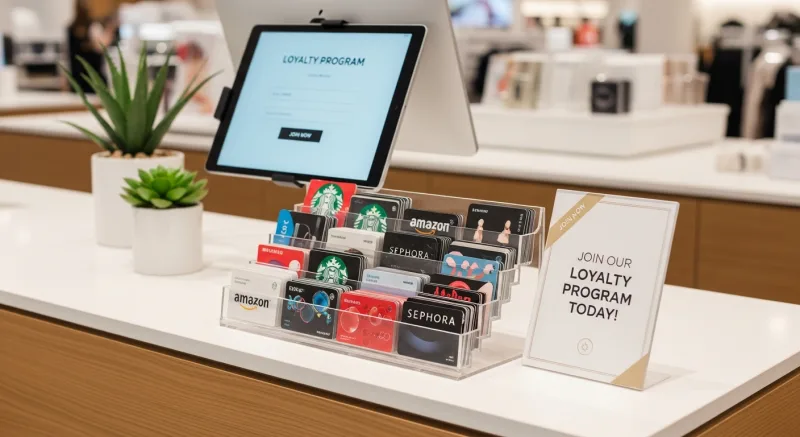
Here's why: threshold psychology. When a customer sees they're 50 points from a free reward, they don't think "I'll come back next week to earn those 50 points." They think "What can I add to this order right now to hit that threshold?"
But it gets worse — in the best way. This behavior is completely predictable, which means you can engineer it:
- Display point balances at checkout. On the customer-facing screen, on the receipt, in the loyalty app. Make the gap between current balance and next reward impossible to ignore.
- Set reward thresholds just above average ticket. If your average transaction is $32, set the reward threshold at $40. Customers will add $8 in impulse items to close the gap. Sound familiar? That's our $8 figure again — it's not a coincidence.
- Offer bonus point days on slow days. "Double points every Tuesday" drives traffic on your weakest day and conditions customers to buy more when they visit.
- Members-only pricing on impulse items. Display the regular price and the member price side by side on checkout displays. Non-members see the savings they're missing — and sign up on the spot.
Tiger Sugar runs loyalty through their 2 self-ordering kiosks — customers see their point balance before they order, which consistently drives add-on purchases like extra toppings and larger sizes. The kiosk makes the personalization feel natural, not pushy.
POS-Driven Prompts: Teaching Your System to Sell
Your staff can't remember every cross-sell opportunity for every product combination. But your POS system can.
POS prompts are automated suggestions that appear on the cashier's screen when specific items are scanned. Scan a coffee maker? The system prompts: "Suggest filters and descaling solution." Scan a yoga mat? "Suggest carrying strap and cleaning spray."
This isn't about replacing your staff's judgment. It's about giving them superpowers. Even your newest, least experienced cashier becomes a cross-selling expert when the POS tells them exactly what to suggest and when.
Setting Up Effective POS Prompts
- Map your top 20 products to their natural add-ons. Start with your best sellers and work outward. You don't need to map every SKU — focus on the products that appear in the most transactions.
- Write the script, not just the product name. Instead of "Suggest: screen protector," write "These screen protectors are designed specifically for this phone — would you like to add one for $4.99?" The cashier reads a complete sentence, not a cryptic reminder.
- Track acceptance rates. Use your POS reporting to see which prompts convert and which get ignored. A prompt with a 2% acceptance rate is noise. Replace it. A prompt with a 15% rate is gold. Feature it more prominently.
- Combine with loyalty data. KwickOS can tailor prompts based on membership status. A returning loyalty member might see "Welcome back! You're 40 points from your next reward — add a travel charger to earn those points today." That's not a generic upsell. That's a personalized invitation.
Crafty Crab Seafood uses one-click menu sync across 19 locations to ensure that upsell prompts and modifier suggestions are consistent everywhere. A suggestion that works at location #1 gets rolled out to all 19 stores with a single update — no manual reprogramming at each terminal.
Seasonal Impulse: Timing Your Displays to Human Behavior
Impulse buying isn't constant. It surges around holidays, weather changes, local events, and cultural moments. The stores that anticipate these surges — rather than reacting to them — capture revenue that their competitors miss entirely.
Here's the thing: seasonal impulse isn't just about Christmas and Valentine's Day. It's about every moment when customers are emotionally primed to buy. Back-to-school. First warm day of spring. The weekend before a local sports event. Each of these creates a 48- to 72-hour window where specific products practically sell themselves — if they're in the right spot.
The Seasonal Impulse Calendar
| Period | Impulse Opportunity | Checkout Zone Products |
|---|---|---|
| Jan 1-15 | New Year's resolutions | Water bottles, planners, healthy snacks |
| Feb 1-14 | Valentine's Day last-minute | Gift cards, chocolates, small gifts |
| Late April | Spring cleaning | Organizers, cleaning products, storage |
| May (1st week) | Mother's Day | Gift cards, candles, self-care items |
| Late Aug | Back to school | Notebooks, tech accessories, snacks |
| Nov-Dec | Holiday gift rush | Gift cards, stocking stuffers, wrapping |
Notice how gift cards appear in nearly every seasonal window. That's not a coincidence — gift cards are the universal last-minute solution. A well-stocked, prominently displayed gift card program turns every holiday into incremental revenue.
Use your POS sales data to build your own calendar. KwickOS reports show sales trends by product, day, and hour — you'll spot your store's unique seasonal patterns within the first quarter of tracking.
Measuring What Works: The Numbers That Matter
You can't optimize what you don't measure. Here are the five metrics that tell you whether your impulse strategy is working:
- Average transaction value (ATV). Track this weekly. A successful impulse program should increase ATV by $3 to $8 within the first month.
- Items per transaction (IPT). If ATV goes up but IPT stays flat, customers are buying more expensive items — not more items. You want IPT to increase, which confirms impulse add-ons are working.
- Checkout zone revenue per square foot. Calculate the revenue generated by your checkout display area and compare it to your store average. It should be 3x or higher.
- POS prompt acceptance rate. Track how often cashiers present prompts and how often customers accept. Target 10% to 20% acceptance.
- Gift card and loyalty enrollment rate. These are leading indicators — customers who enroll today become impulse buyers tomorrow.
T. Jin China Diner tracks these metrics across 15 locations and 75 terminals from a single dashboard. When one location outperforms others on add-on sales, the team can see exactly what that location is doing differently — which displays are up, which prompts are active, which staff members are excelling — and replicate it everywhere.
The Implementation Checklist: Start This Week
You don't need to overhaul your entire store to start capturing impulse revenue. Here's a phased approach that any retailer can execute:
Week 1 — Checkout zone audit:
- Clear dead space around the register
- Place 5-10 high-margin items ($1-$15) within arm's reach
- Move gift card display within 3 feet of checkout
- Configure your customer-facing display to show add-on prompts
Week 2 — POS prompt setup:
- Map your top 20 products to natural add-ons
- Write complete suggestion scripts for staff
- Enable checkout prompts in your POS system
- Brief staff on the "why" — when they understand the margin impact, buy-in follows
Week 3 — Loyalty integration:
- Set reward thresholds just above average ticket
- Enable point balance display at checkout
- Create a members-only impulse item pricing tier
- Train staff to mention point gaps: "You're only 40 points from your next reward"
Week 4 — Measure and iterate:
- Pull ATV and IPT reports from your POS
- Compare to your pre-implementation baseline
- Drop low-performing prompts and displays
- Double down on what's converting
The stores that execute this checklist consistently see $5 to $10 increases in average transaction value within the first month. On 150 daily transactions, that's $750 to $1,500 per day in additional revenue — with virtually zero additional cost.
Turn Every Checkout Into a Revenue Opportunity
KwickOS gives you customer-facing displays, POS prompts, loyalty integration, and gift card programs — all in one platform. See how it works for your store.
Get a Free Demo