 Ming Ye
It's 3 AM. Your restaurant is dark. The register is off, the kitchen is cold, and every employee is asleep.
And 340 orders just came in.
Not this month — this year, from a single mid-size restaurant running automated ordering. That's 340 tickets that would have been a busy signal, a voicemail, or a customer who shrugged and ordered from the place down the street. Instead they were captured, paid for, and queued up for the morning prep list.
Here's the uncomfortable part: you're already losing these orders right now. You just can't see them, because a missed order doesn't show up on any report. There's no line item called "revenue we never knew existed." The phone rang, nobody answered, and the money quietly walked to a competitor.
But it gets worse. It isn't only the 3 AM crowd. It's the Friday dinner rush when both lines are busy and a regular gives up after four rings. It's the caterer trying to place a $600 order during your lunch slam. It's the customer who wants to order but hates talking on the phone — which, for anyone under 35, is most of them.
Automated ordering fixes all of it. Not by replacing your staff, but by making sure an order is never lost simply because a human wasn't free to take it. Let's break down exactly how it works — and where the real money hides.
What "Automated Ordering" Actually Means (It's Four Things, Not One)
The phrase gets thrown around loosely, so let's be precise. A complete automated ordering system is really four channels working from the same menu and flowing into the same POS:
- First-party online ordering. Your own branded ordering page — not DoorDash, not Grubhub. The customer picks items, customizes, pays, and the order lands in your kitchen. You keep 100% of the sale minus processing, and you own the customer's data.
- AI chatbot ordering. A conversational assistant on your website, Instagram, or Facebook that answers questions ("Do you have gluten-free?"), builds an order, and closes the sale inside the chat — no app download, no phone call.
- Voice AI. An AI that answers the phone in a natural voice, takes the order, reads it back, and pushes it to the kitchen. It handles ten simultaneous callers without a single hold message.
- Self-service kiosks. In-store screens where the customer orders and pays directly — the same automation, just standing at your counter.
Here's the thing: any one of these on its own is a nice convenience. All four, sharing one menu and one POS, become a revenue capture net that catches orders no matter when, where, or how the customer wants to place them.
The After-Hours Goldmine Nobody Talks About
Let's talk about the money you can't see, because that's where the biggest surprise lives.
When your restaurant closes, ordering doesn't stop — intent doesn't keep business hours. Someone finishing a late shift wants to schedule a pickup for tomorrow. A party planner wants to lock in Saturday's catering at 11 PM when they finally have a free minute. A regular remembers they need lunch for the office and orders it at midnight for noon delivery.
Without automation, all of that intent evaporates. With it, the order is captured, paid, and scheduled.
Consider the math. A restaurant that captures just 7 after-hours orders per night at a $38 average ticket is adding roughly $266 a day — about $97,000 a year in revenue that previously didn't exist. And these orders carry almost no incremental labor cost, because the system did the order-taking for free.
Pattern interrupt: this is not "extra marketing." You are not spending money to generate demand. The demand already exists — you are simply no longer throwing it away.
Where Most Automated Ordering Quietly Fails
Now for the trap, because plenty of restaurants bolt on an ordering widget and see disappointing results. The failure almost always comes down to one word: integration.
A standalone ordering system that isn't wired into your POS creates a second, parallel operation. Orders come in through a separate tablet that beeps in a corner. Someone has to notice it, read it, and re-key it into the real POS. Menu changes have to be made twice. Sold-out items don't update, so the AI happily sells a customer the last thing you ran out of at 6 PM. Prices drift out of sync. The "automation" created a new manual job.
And that's not all: when ordering and POS are separate, your gift cards, loyalty points, and reporting fracture. A customer's e-gift card balance online doesn't match the register. Loyalty points earned on a phone order never post. Your end-of-day numbers require a reconciliation ritual that eats an hour of a manager's night.
The fix is architectural, not cosmetic. The ordering channels and the POS have to be the same system — one menu, one inventory count, one customer record, one payment ledger. That's the difference between automation that saves labor and "automation" that quietly adds it.
How Deep POS Integration Changes the Game
When automated ordering lives inside the POS instead of beside it, the whole picture inverts. Here's what actually happens on a unified platform like KwickOS:
- One menu, everywhere. Update a price or 86 an item once, and it changes instantly across your online page, chatbot, voice AI, kiosk, and register. Crafty Crab Seafood runs one-click menu sync across 19 stores and 152 terminals — the same engine keeps every ordering channel truthful in real time.
- Orders route straight to the kitchen. An automated order hits the Kitchen Display System (KDS) exactly like a server-entered ticket, with the same modifiers and special-request handling. Shogun Japanese Hibachi uses customized station displays so each order lands in front of the right cook — automation doesn't break that; it feeds it.
- Checkout is one flow. The same POS checkout logic — taxes, tips, surcharges, discounts — applies to an automated order as to a walk-in. No separate payment path to reconcile.
- Offline resilience. Because KwickOS runs a hybrid local-plus-cloud architecture with ~1ms local latency, your ordering and checkout keep working even when the internet hiccups — the order doesn't vanish because the connection blinked.
- Processor freedom. Every automated order runs through the processor you chose, at rates you negotiated — not a locked-in payment rail skimming an extra 0.5–0.8% off each ticket.
The result: automation that genuinely removes work instead of relocating it.
Gift Cards, Loyalty, and the Automated Upsell
This is where a unified system stops being a defensive play (catching missed orders) and becomes an offensive one (growing every order).
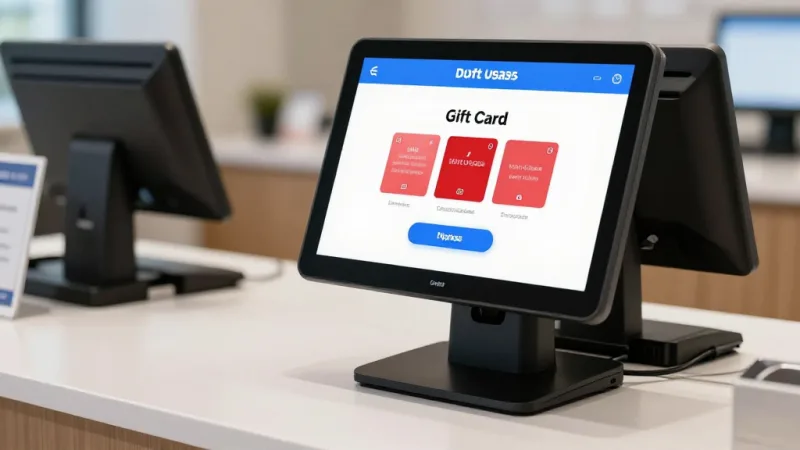
When your automated ordering shares one ledger with your POS, three things happen automatically on every order — awake or asleep:
- Gift cards and e-gift cards just work. A customer can buy a digital gift card at 2 AM as a last-minute present, and the recipient can redeem it against an online order minutes later. The balance is the same balance the register sees — no double-spend, no morning-after reconciliation. Late-night and holiday windows are peak e-gift-card buying moments, and an always-on system is the only way to catch them.
- Loyalty and points accrue on autopilot. Every automated order checks the customer in, awards points, and applies member pricing — the exact rules from your loyalty program, enforced without a staffer remembering to scan a card. Tiger Sugar attaches loyalty to electronic receipts so a two-tap order still builds the relationship. Membership perks and points turn a one-time 3 AM customer into a repeat one.
- The AI upsells with discipline. A well-tuned ordering assistant suggests the combo, the add-on, the "make it a large" — the same suggestive selling your best server does, applied to 100% of orders instead of the ones a busy team remembers to push. Industry data on digital ordering consistently shows automated prompts lift average ticket size, because the screen never forgets and never gets shy.
Loss-aversion reality check: every automated order that doesn't apply loyalty or offer the upsell is a customer relationship and a few dollars of margin you paid to acquire and then left on the table.
Real Operators, Real Patterns
You don't have to imagine this working. The operators already running unified ordering on KwickOS show the pattern clearly:
- T. Jin China Diner — 15 stores, 75 terminals — monitors and controls ordering across every location remotely, so an automated order at any store rolls into one real-time view instead of 15 disconnected inboxes.
- Rockin' Rolls Sushi Express — 3 stores, 49 iPad self-ordering stations — pushed order-taking onto self-service screens that feed the KDS directly, cutting serving time without adding staff.
- Baked Cravings — a 24-hour self-serve kiosk at Lego Land on a PaxA35 terminal — is quite literally a store that takes and processes orders when no employee is standing there.
Different formats, same principle: let the system capture the order, and let people do the work only people can do.
Want to see what after-hours capture is worth for your own numbers? Run them through our delivery fee calculator and processing fee calculator to see how much of each automated order you actually keep.
A Realistic Rollout Plan
You don't flip on all four channels at once. Here's a sane sequence:
- Start with first-party online ordering. It's the highest-value, lowest-risk channel — you're moving orders off 15–30% commission apps and onto a page you own. This alone often pays for the whole project.
- Add the AI chatbot. Put it on your website and social profiles to catch the "I have a quick question, then I'll order" traffic that a static menu loses.
- Turn on voice AI for overflow. Route it to answer only when your lines are busy or after hours at first. Measure how many previously-missed calls it converts.
- Deploy kiosks if your format fits. QSR, fast-casual, dessert, and high-volume counters see the fastest kiosk payback; full-service fine dining usually doesn't.
At each step, the non-negotiable requirement is the same: the channel must write to the same POS. If a vendor can't show you an order flowing from the automated channel to the kitchen display and into unified reporting — including gift card and loyalty handling — without a human retyping it, it isn't automation. It's a second job with a friendly interface.
The Bottom Line
Automated ordering isn't about chasing a robot fad. It's about a simple, unglamorous truth: every order you fail to capture is pure lost profit — no food cost, no labor to recover, just gone. The phone that rang unanswered, the late-night intent that expired, the customer who wanted to order by text instead of talking.
Get the four channels running from one menu, wire them into a POS that handles checkout, gift cards, and loyalty as one system, and you stop leaking those orders. The restaurant keeps taking orders when the lights are off — and every one of them arrives fully paid, fully attributed, and ready to cook.
340 orders at 3 AM isn't a gimmick. It's what "open" looks like when your ordering system never sleeps.
Turn Off Hours Into On Sales
KwickOS unifies online ordering, AI chat and voice, and kiosks with your POS, gift cards, and loyalty — one platform, one menu, orders 24/7. See how much you're leaving on the table.
See KwickOS for RestaurantsFrequently Asked Questions
What is an automated ordering system for restaurants?
An automated ordering system lets customers place and pay for orders without a staff member taking them down. It spans first-party online ordering pages, AI chatbots on your website and social channels, voice AI that answers the phone, and self-service kiosks. When the system is integrated with your POS, those orders flow straight to the kitchen display and your reporting with no manual re-keying — 24 hours a day, including hours when nobody is in the building.
How much revenue do restaurants lose by not answering the phone or capturing after-hours orders?
Industry research suggests that roughly one in six restaurant phone calls goes unanswered during peak hours, and a meaningful share of those callers never call back — they order from a competitor instead. On a $35 average ticket, even five missed calls a day works out to more than $63,000 in lost annual sales. Automated ordering captures those orders whether the line is busy, the restaurant is slammed, or the doors are closed for the night.
Does automated ordering work with gift cards and loyalty programs?
Yes, when the ordering system shares one platform with your POS. On KwickOS, a customer placing an order at 3 AM can redeem an e-gift card, apply a promo code, and earn loyalty points automatically — the same rules that apply at the register apply online. Because the balance and points ledger are unified, there is no reconciliation the next morning and no way to double-spend a gift card across channels.
Will an AI ordering system replace my staff?
No. The goal is to remove order-taking friction, not people. Automated ordering handles the repetitive, low-skill task of capturing a standard order and payment so your team can focus on cooking, hospitality, and the complex requests that actually need a human. Most operators use it to cover the phones during a rush and to stay open for orders after the last employee goes home.