 Ming Ye
Pull your last month of transaction records. Now search for voids, refunds, and price adjustments on weighed items.
Found a few? Good. Now consider all the ones that were never caught.
If you run a deli counter, butcher shop, or grocery store and your scale is not directly integrated with your POS, you are losing an average of $11,200 per year to pricing errors. That is not a hypothetical. It is the documented average across businesses that switched from standalone scales to POS-integrated weighing and tracked the difference.
Here is the thing: it is not just the obvious errors. It is the deli clerk who eyeballs a half-pound of roast beef and rings it up as 0.50 lb when it was actually 0.57 lb. It is the butcher who wraps a $14.99/lb ribeye, scribbles the price on the paper, and the cashier keys it in wrong at checkout. It is the produce employee who forgets to tare the bag weight and charges the customer $0.40 extra for plastic.
One of these errors is a rounding mistake. A hundred of them per week is a broken system.
But it gets worse: these errors go in both directions. You undercharge customers and lose revenue. You overcharge customers and lose trust. And when the local Weights and Measures inspector shows up unannounced — which they do — a single non-compliant scale can cost you $500 to $10,000 in fines per violation.
This guide covers everything you need to know about integrating scales with your POS system: the hardware, the software, PLU codes, tare weights, label printing, legal compliance, and the workflow changes that eliminate pricing errors for good.
Why Standalone Scales Cost You Money Every Single Day
The fundamental problem with a non-integrated scale is the gap between weighing and pricing. When these are two separate steps — weigh on the scale, then manually enter the weight or price into the POS — errors are inevitable.
Here is what that gap looks like in practice:
- Manual entry errors. A clerk weighs 1.23 lbs of smoked turkey but keys 1.32 lbs into the POS. That is a 7.3% overcharge on a single transaction. Multiply by 80 deli transactions per day and the cumulative error is staggering.
- Wrong PLU codes. Your deli has 47 items at different price points. The clerk grabs the domestic Swiss cheese ($8.99/lb) but enters the PLU for imported Swiss ($13.99/lb). The customer just paid $5.00 extra per pound and neither party noticed.
- Missing tare weights. A deli container weighs 0.03 lbs. At $12.99/lb for premium salads, that is $0.39 per container in phantom charges. Across 120 salad containers per day, you are overcharging customers by $46.80 daily — $17,082 per year. One Yelp review about it, and the damage multiplies.
- Price changes not synced. You updated the price of ground beef from $5.99 to $6.49/lb in the POS last Tuesday. But the standalone scale at the butcher counter still has the old price programmed. Every pound of ground beef sold at the counter since Tuesday has been undercharged by $0.50.
And that is not all: standalone scales create a speed problem too. Every manual entry takes 8 to 15 seconds. At a busy deli counter serving 200 customers per day, that is 26 to 50 minutes of pure data entry — time your staff could spend actually serving customers.
How POS-Integrated Scales Actually Work
A POS-integrated scale connects directly to your point-of-sale system through a serial (RS-232), USB, or Ethernet cable. When an item is placed on the scale, the weight data is sent directly to the POS in real time — no manual entry required.
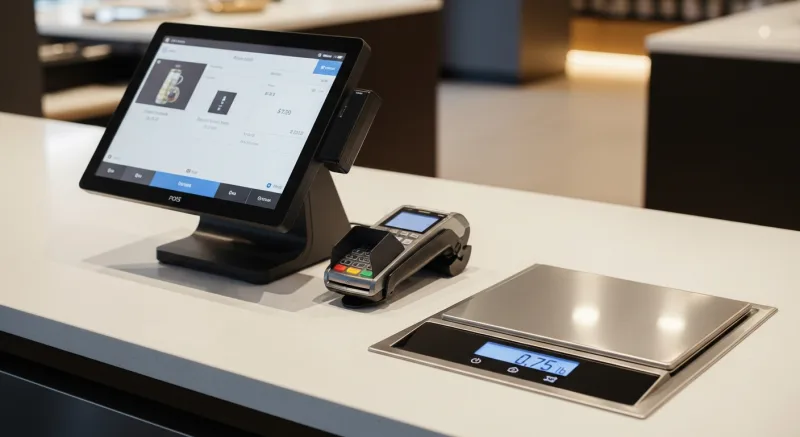
Here is the typical workflow:
- Employee places the item on the scale. The weight appears on both the scale display and the POS screen simultaneously.
- Employee selects the item from the POS. This can be done by tapping a PLU button, scanning a barcode, or searching by name. The POS already knows the price-per-pound for that item.
- The POS calculates the price automatically. Weight × price-per-unit = total. No manual math. No manual entry. The tare weight for the selected container type is subtracted automatically.
- A label prints (optional). If using a label-printing scale, a barcode label is generated with the item name, weight, price per pound, total price, packed date, and sell-by date. This label can be scanned at checkout — the item does not need to be weighed again.
The entire process takes 3 to 5 seconds. Compare that to the 15 to 25 seconds for a standalone scale workflow with manual entry, and you start to understand why integrated scales pay for themselves in weeks, not months.
PLU Codes: The Foundation of Weight-Based Pricing
PLU codes — Price Look-Up codes — are the backbone of any scale-integrated POS setup. Every weighed item in your store gets a unique PLU code that links the product to its name, price, department, tax status, and tare weight.
Here is what you need to know:
- Standard PLU codes are 4-digit numbers (1000-9999) assigned by the International Federation for Produce Standards (IFPS). These are universal across all grocery stores — PLU 4011 is always a yellow banana, PLU 4065 is always a green bell pepper. If you sell standard produce, use these codes.
- Custom PLU codes are store-specific codes you assign to your own products — deli items, butcher cuts, prepared foods, bulk bins. Most POS systems support 5-digit PLU codes for custom items, giving you up to 90,000 unique product codes.
- PLU barcodes embed the PLU code and weight into a scannable barcode format. The most common format uses prefix "2" followed by the PLU and a price or weight field. When a cashier scans this barcode, the POS knows exactly what the item is and what it costs without re-weighing.
Here is where most businesses get it wrong: they set up PLU codes once and never maintain them. Prices change. New items get added. Old items get discontinued. If your PLU database is out of sync with your actual product list and pricing, the whole system breaks down.
With a POS-integrated scale, PLU updates happen in one place — the POS — and push automatically to every connected scale in the store. Change the price of roast beef in the POS, and every scale at every counter reflects the new price within seconds. No walking around with a USB stick. No forgetting to update the butcher counter scale.
Compare that to how operations like barcode-based retail inventory work, and you can see why integration is not optional — it is foundational.
Tare Weight: The Compliance Issue Nobody Talks About
Tare weight is the weight of the container, wrapping, or packaging that holds the product. By law, customers cannot be charged for packaging weight. This is not a suggestion — it is enforced by state and local Weights and Measures inspectors, and violations carry real fines.

But it gets worse: most standalone scales require the operator to manually press a "tare" button before placing the item. If they forget — and at 200 transactions per day, they will forget — the customer is overcharged for the container weight.
A POS-integrated scale handles tare weight automatically:
| Container Type | Typical Weight | Overcharge at $12.99/lb | Daily Impact (120 units) |
|---|---|---|---|
| Small deli container (8 oz) | 0.03 lb | $0.39 | $46.80 |
| Large deli container (16 oz) | 0.05 lb | $0.65 | $78.00 |
| Butcher paper wrap | 0.02 lb | $0.26 | $31.20 |
| Foam tray + plastic wrap | 0.04 lb | $0.52 | $62.40 |
| Produce bag | 0.01 lb | $0.13 | $15.60 |
In a POS-integrated setup, each PLU code is linked to a default container type with a preset tare weight. When the employee selects "potato salad" from the POS, the system automatically subtracts 0.03 lb for the standard deli container. If they use a different container, they can select the container type from a dropdown — but they cannot skip the tare step entirely.
This is not just about accuracy. It is about legal compliance. And if you are using KwickOS, the system logs every tare adjustment for audit purposes — so when the inspector asks to see your records, you have them.
Label Printing: From Counter to Checkout in One Scan
Label-printing scales are the gold standard for deli and butcher operations. Instead of just weighing the item, they print a barcode label that contains everything the checkout cashier needs: item name, weight, price per pound, total price, packed date, and sell-by date.
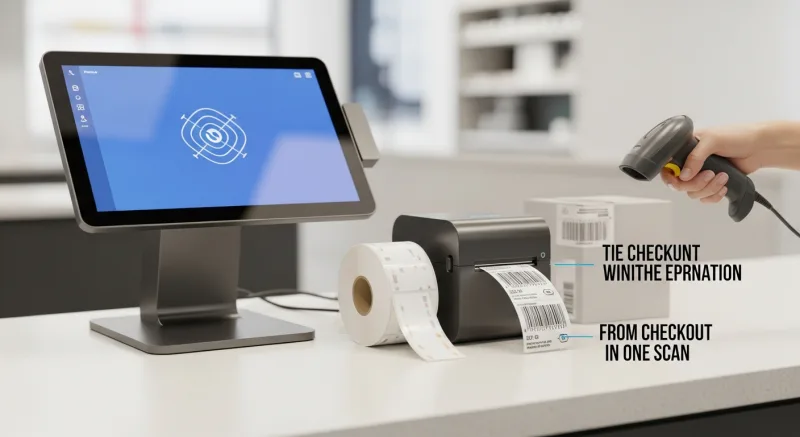
Here is the thing: without label printing, every weighed item has to be weighed again at checkout. That means the customer waits at the deli counter for weighing, then waits again at the register for re-weighing. Two bottlenecks for one item. And if the cashier does not have a scale at the register, they are manually entering the price from a handwritten sticker — which brings us back to the manual entry error problem.
With a label-printing scale integrated into your POS:
- One weigh, one label, one scan at checkout. The barcode on the label contains the PLU and either the weight or the pre-calculated price. The cashier scans it like any other item. No re-weighing. No manual entry.
- Sell-by dates print automatically. The POS knows that sliced turkey has a 5-day shelf life and roast beef has 7 days. The label calculates and prints the correct sell-by date based on today's date. No mental math. No incorrect dates.
- Ingredient and allergen info can print on the label. For prepared foods, the label can include a list of ingredients and common allergens — a requirement in many jurisdictions and a growing customer expectation.
- Batch and lot tracking. For butcher shops that need to trace meat back to a specific supplier or batch, the label can encode lot numbers for food safety and compliance tracking.
The speed improvement alone is worth the investment. A busy deli counter processing 200 labels per day saves roughly 40 minutes of checkout time compared to re-weighing or manual price entry. That is 40 minutes of cashier time freed up, plus shorter lines for every customer behind the weighed-item buyer.
Legal-for-Trade Compliance: What the Inspector Is Looking For
Every scale used to determine the price of goods sold by weight must be NTEP-certified (National Type Evaluation Program). This is not negotiable. It is federal and state law.
Here is what "legal-for-trade" actually means and why it matters:
- NTEP certification. The scale has been tested by an NTEP laboratory and found to meet accuracy standards within defined tolerances. An NTEP Certificate of Conformance (CC) number is assigned to the scale model.
- Capacity and division size. A scale must display weight in increments appropriate for the goods being sold. For deli and butcher, this is typically 0.01 lb or 0.005 kg divisions.
- Annual inspection. Most states require commercial scales to be inspected annually by Weights and Measures officials. The scale must have a current inspection sticker visible to customers.
- Customer-visible display. The weight display must be visible to the customer during the transaction. This is a legal requirement, not just good practice.
And that is not all: when your scale is integrated with your POS, the inspection covers the entire weighing-and-pricing chain — not just the scale hardware. The inspector may verify that the price displayed on the POS matches the price used to calculate the total, and that tare weights are being applied correctly.
Penalties for non-compliance vary by state but typically range from $500 for a first offense to $10,000 or more for repeat violations. In some states, selling goods on a non-certified scale is a criminal misdemeanor. It is not worth the risk.
The Deli Counter Workflow: Before and After Integration
Let us walk through a real deli counter scenario to see how integration changes the daily workflow.
Before: Standalone Scale + Manual POS Entry
- Customer requests 3/4 pound of honey-glazed turkey.
- Clerk places turkey on standalone scale. Scale reads 0.78 lb.
- Clerk mentally calculates: 0.78 × $11.99 = ... pulls out calculator ... $9.35.
- Clerk writes "$9.35" on a sticker and places it on the deli container.
- Customer goes to checkout. Cashier reads the handwritten sticker.
- Cashier keys in $9.35 manually. (But was it $9.35 or $9.53? The handwriting is unclear.)
- Transaction completes. Maybe accurate. Maybe not. No audit trail either way.
Time: 45 seconds at the deli + 20 seconds at checkout = 65 seconds total.
After: Integrated Scale + Label Printer + POS
- Customer requests 3/4 pound of honey-glazed turkey.
- Clerk places turkey on integrated scale. POS screen shows 0.78 lb in real time.
- Clerk taps "Honey Glazed Turkey" on the POS screen. Price calculates automatically: 0.78 lb × $11.99/lb = $9.35. Tare weight (0.03 lb container) is already subtracted.
- Label prints with barcode, item name, weight, price, packed date, and sell-by date.
- Customer goes to checkout. Cashier scans barcode label.
- Transaction completes. 100% accurate. Full audit trail.
Time: 15 seconds at the deli + 3 seconds at checkout = 18 seconds total.
That is a 72% reduction in transaction time. For a deli counter processing 200 orders per day, integration saves roughly 2.6 hours of combined staff time daily. At $15/hour, that is $39/day or $14,235/year in labor savings alone — before you even count the eliminated pricing errors.
Choosing the Right Scale for Your Business
Not all POS-integrated scales are created equal. The right choice depends on your business type, counter layout, and transaction volume.
| Scale Type | Best For | Price Range | Key Features |
|---|---|---|---|
| Bench scale (POS-connected) | Butcher counter, produce | $300-$600 | RS-232/USB to POS, customer display, NTEP certified |
| Label-printing scale | Deli, prepared foods, cheese | $800-$2,500 | Built-in printer, barcode labels, sell-by dates |
| Checkout counter scale | Register-side weighing | $200-$400 | Flat profile, built into checkout counter, produce weighing |
| Hanging scale | Produce display, farmers market | $400-$800 | Overhead mount, customer-facing, high visibility |
| Floor scale | Bulk receiving, warehouse | $500-$1,500 | High capacity (500+ lbs), pallet weighing, back-of-house |
For most deli and butcher operations, a label-printing scale in the $1,200-$1,800 range is the sweet spot. It handles everything — weighing, pricing, labeling, and POS sync — in a single unit. At that price, the scale pays for itself in 6 to 8 weeks through eliminated errors and time savings.
Before purchasing, verify that the scale is compatible with your POS system. KwickOS supports all major commercial scale protocols including RS-232, USB HID, and Ethernet, and works with brands like CAS, Digi, Ishida, and Mettler Toledo. Not every POS can say the same — systems like Toast and Square have limited or no scale integration support, which is another reason processor-agnostic, hardware-flexible platforms matter.
Real-World Implementation: What to Expect
Setting up a POS-integrated scale is not as complex as it sounds, but there are a few things that trip people up. Here is a realistic implementation timeline:
Week 1: Hardware and PLU Setup
- Install the scale and connect it to your POS (15-30 minutes per scale).
- Enter all PLU codes with product names, prices, departments, tare weights, and shelf-life days.
- A typical deli with 80-120 items takes 2-3 hours to set up the complete PLU database.
- Test every PLU to verify correct pricing and label output.
Week 2: Staff Training and Parallel Running
- Train deli and butcher staff on the new workflow (typically 1-2 hours per employee).
- Run both old and new systems in parallel for one week to catch setup errors.
- Verify that label barcodes scan correctly at all checkout registers.
Week 3: Full Cutover
- Retire the standalone scale.
- Monitor error rates and adjust PLU entries as needed.
- Establish a weekly review process for price updates and new items.
Businesses that have gone through this process — including grocery operations running on KwickOS with full barcode and inventory integration — consistently report that the transition is smoother than expected. The technology is mature. The hard part is not the hardware. It is the discipline of maintaining your PLU database.
5 Mistakes That Undermine Scale Integration
Even with the best hardware, these common mistakes will cost you:
- Not calibrating regularly. Scales drift. Commercial scales should be calibrated monthly using certified test weights. Most POS-integrated scales have a built-in calibration mode, but someone has to actually run it.
- Ignoring tare weight for new containers. You switched from foam trays to compostable containers last month. Did you update the tare weights in the POS? The new containers weigh 0.06 lb instead of 0.04 lb. That is a $0.26/container overcharge at $12.99/lb.
- Letting PLU prices go stale. Assign one person to update PLU prices weekly. If no one owns it, prices drift. A single month of stale pricing can cost more than the scale itself.
- Skipping the customer display. A customer-facing weight display is legally required in most jurisdictions. But beyond compliance, it builds trust. When customers can see the weight themselves, disputes drop to near zero.
- Buying a non-NTEP scale to save $100. A $200 consumer scale is not legal for trade. Period. The first inspection fine will cost more than the difference between a consumer scale and a proper commercial unit. Spend the $300-$600 and sleep at night.
The Bottom Line: Integration Is Not Optional Anymore
If you sell anything by weight — deli meats, cheese, produce, bulk goods, butcher cuts, prepared foods, or baked goods — a standalone scale is costing you money every single day.
The numbers are clear:
- $11,200/year in pricing errors eliminated.
- $14,235/year in labor time saved.
- $0 in Weights and Measures fines (versus $500-$10,000 per violation without proper compliance).
- 72% faster deli-to-checkout transaction time.
A POS-integrated scale costs $300 to $2,500 depending on features. The return on investment is measured in weeks, not years. And with a platform like KwickOS that supports any commercial scale protocol, you are not locked into a single hardware vendor — just like you are not locked into a single payment processor.
That processor-agnostic philosophy extends to hardware too. KwickOS runs on Linux, supports RS-232, USB, and Ethernet scale connections, and integrates with label printers from every major manufacturer. Your butcher counter scale, your deli label printer, and your checkout scanner all talk to the same system — no middleware, no translation errors, no $3,000-$8,000/year in locked-in hardware fees.
For multi-location operators like T. Jin China Diner (15 stores, 75 terminals) or Crafty Crab Seafood (19 stores, 152 terminals), centralized PLU management means updating prices once and pushing to every scale in every store simultaneously. One click. All locations. Zero discrepancies.
Weigh Smarter, Price Accurately, Sell Faster
KwickOS integrates with every major commercial scale. See how unified weighing, pricing, and checkout can transform your deli, butcher, or grocery operation.
Get a Demo