 Ming Ye
Watch your cashier scan a crumpled barcode on a bag of chips.
Count the seconds. One. Two. Three. Now they flip the bag. Try again. Tilt it. Finally — beep.
That was 3 seconds on a single item. Multiply it across 47 items in an average grocery basket, 200 transactions per day, 6 days a week. You're bleeding 15–20 hours of cashier time every month because your $40 scanner can't read a wrinkled UPC from more than 3 inches away.
Here's the thing: a $180 2D imager reads that same crumpled barcode in 0.3 seconds. From any angle. From a phone screen. Even when the label is torn, faded, or partially covered by the customer's thumb.
That 2.7-second difference per scan doesn't sound like much — until you realize it's the difference between a checkout line that moves and one that makes customers abandon their carts and walk out.
And that's not all. The wrong scanner choice locks you into limitations you won't discover until Black Friday, when your ancient laser can't read the QR code on a customer's digital coupon and you're apologizing while the line snakes to the back of the store.
This guide covers every scanner type, every connection method, and the real costs — so you buy once, buy right, and never think about barcode scanning again.
1D vs 2D Scanners: The Technology Gap That Costs You Daily
Before you compare brands or prices, you need to understand the fundamental technology split. Every barcode scanner on the market falls into one of two categories, and choosing the wrong one is the most expensive mistake you can make.
1D Laser Scanners (The Old Guard)
1D scanners use a laser line to read traditional linear barcodes — the kind with vertical black-and-white stripes you see on every grocery product (UPC-A, EAN-13, Code 128, Code 39).
They work. They've worked for 40 years. And they have one job: read a straight barcode on a flat surface, held at the right angle, from 6–12 inches away.
The problem? The world has moved past 1D barcodes.
- QR codes on digital coupons, loyalty apps, and mobile payments — a 1D scanner can't read them.
- 2D barcodes on shipping labels, driver's licenses for age verification, and warehouse inventory — invisible to a laser scanner.
- Damaged or curved barcodes on bottles, crumpled packaging, or worn labels — a laser needs a clean line to read, and retail doesn't do "clean."
A 1D scanner costs $30–$80. It seems cheap until you realize what it can't do.
2D Imager Scanners (The Standard for 2026)
2D scanners use a tiny camera sensor (area imager) to take a picture of the barcode and decode it with software. This means they read everything: 1D barcodes, QR codes, Data Matrix codes, PDF417 codes on driver's licenses, and barcodes displayed on phone screens.
But it gets worse for anyone still using 1D: the speed difference is dramatic.
| Scenario | 1D Laser | 2D Imager |
|---|---|---|
| Clean barcode, flat surface | 0.5 sec | 0.3 sec |
| Damaged or wrinkled barcode | 1–3 sec (multiple attempts) | 0.3–0.5 sec |
| Curved surface (bottle, can) | 1–2 sec (angle dependent) | 0.3 sec (any angle) |
| Phone screen (digital coupon/QR) | Cannot read | 0.3–0.5 sec |
| Partially obscured barcode | Fails | 0.5–1 sec (reads partial) |
The price gap has shrunk dramatically. In 2020, a quality 2D imager cost $300+. In 2026, reliable 2D scanners from Zebra and Honeywell start at $120–$150. There's no longer a financial argument for buying 1D-only scanners.
Our recommendation: buy 2D for every new scanner purchase, no exceptions. The 1D scanner is a dead-end investment.
Wired vs Wireless: Reliability vs Freedom
Once you've decided on 2D (which you should), the next decision is connection type. This one actually depends on your operation.
Wired USB Scanners
A USB scanner plugs into your POS terminal and works instantly. No pairing. No batteries. No charging cradle. No Bluetooth dropouts during Friday rush.
Choose wired when:
- The scanner lives at a fixed checkout station
- You want zero maintenance — plug in and forget
- Budget matters — wired scanners cost 30–50% less than wireless equivalents
- You're in a high-interference environment (commercial kitchens with microwaves, metal shelving)
Cost: $80–$250 for quality 2D models.
Wireless Bluetooth Scanners
Bluetooth scanners give you freedom to move. Walk the aisles for inventory counts. Scan items tableside at a restaurant. Bust checkout lines by scanning in the queue.
Here's the thing: that freedom comes with trade-offs.
- Battery life — 8–16 hours on a full charge, depending on scan volume. If your cashier forgets to dock it overnight, you're starting the morning with a dead scanner.
- Bluetooth pairing issues — most are reliable once paired, but initial setup can be finicky. Some POS systems handle Bluetooth better than others.
- Range limits — typical Bluetooth range is 30–100 feet, depending on walls and interference. Walk too far from the POS and you lose connection.
- Higher cost — the wireless equivalent of a $150 wired scanner runs $250–$400.
Choose wireless when:
- Staff need to move — inventory counts, receiving, line busting
- Your checkout counter doesn't have USB ports accessible (tablet POS setups)
- You need to scan items away from the terminal (tableside, curbside pickup)
Cost: $150–$400 for quality 2D Bluetooth models.
The smart play for most businesses: wired at the checkout, wireless for everything else. Rockin' Rolls Sushi Express runs 3 stores with 49 iPad self-ordering stations — each station uses a compact wired USB scanner for gift card and loyalty scans, while managers carry wireless scanners for inventory receiving.
Handheld vs Countertop vs In-Counter: Form Factor Matters
The shape of your scanner determines how fast your checkout moves. Get this wrong and you're fighting your own hardware 200 times a day.
Handheld (Gun-Style)
The classic barcode scanner shape. Point, pull the trigger, beep. Works for everything from retail checkout to warehouse receiving.
Best for: Retail stores, restaurants scanning inventory, any operation under 150 scans/hour.
Cost: $80–$300
Countertop Presentation
Sits on the counter facing upward. The cashier swipes items across the scan window — hands-free, no trigger pulling. Think grocery store express lane.
And that's not all: countertop scanners also work as handheld. Most models can be picked up to scan heavy or awkward items that can't be swiped across the window.
Best for: Grocery stores, convenience stores, any operation over 150 scans/hour. Diva Nail Beauty uses countertop scanners at their 4 retail checkout stations for scanning product barcodes during high-traffic product sales.
Cost: $200–$500
In-Counter (Flush-Mount)
Built into the counter surface. The scanner window is flush with the checkout counter — items slide across it like a supermarket conveyor belt setup.
Best for: High-volume grocery, big-box retail with 500+ scans/hour. Requires counter modification for installation.
Cost: $500–$1,200 (plus installation)
The Real Cost of a Cheap Scanner
Let's do the math that most business owners skip. A $40 budget scanner vs a $180 quality scanner — the $140 difference seems significant until you calculate what that $40 scanner actually costs you.
| Cost Factor | $40 Budget Scanner | $180 Quality 2D Scanner |
|---|---|---|
| Scanner purchase | $40 | $180 |
| Replacement in year 1 (70% failure rate) | $28 (prorated) | $0 |
| Slow scans: 2 extra sec × 300 scans/day × 300 days | 50 hours of labor ($750 at $15/hr) | $0 |
| Can't scan QR — manual coupon entry: 30 sec × 20/day | 50 hours of labor ($750 at $15/hr) | $0 |
| Customer walkouts from slow checkout (est. 2/week) | $3,120/yr (at $30 avg ticket) | $0 |
| Year 1 true cost | $4,688 | $180 |
You're not saving $140. You're paying $4,508 more for the privilege of frustrating your cashiers and losing customers. That's the loss aversion math most scanner buyers never run.
Use our POS hardware cost calculator to estimate the true cost of your entire checkout setup.
Scanner Compatibility: Why Your POS Choice Matters
Here's the part that catches people off guard. Not every scanner works with every POS system — and some POS vendors make it deliberately complicated.
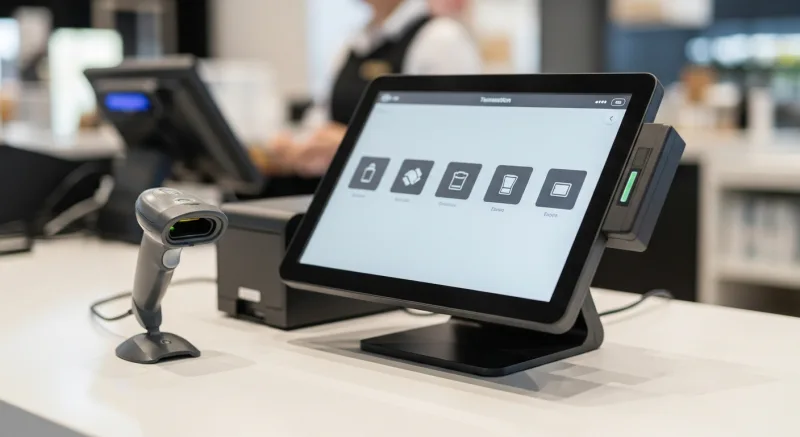
Most USB barcode scanners operate as HID keyboard emulators. When you scan a barcode, the scanner "types" the barcode number into whatever field is active on screen, then sends an Enter keystroke. This means any USB HID scanner works with any POS that accepts keyboard input — which is virtually all of them.
But it gets worse for some POS users:
- Toast sells proprietary hardware bundles that include their specific scanner. You can use a third-party scanner, but Toast's support won't help you configure it, and some features (like scanning Toast gift cards) may not work with non-Toast scanners.
- Square officially supports only a small list of scanners. Others may work, but you're on your own.
- Clover uses a proprietary barcode scanner accessory. Third-party scanners require workarounds.
With a processor-agnostic, open-hardware POS like KwickOS, any standard USB or Bluetooth HID scanner works out of the box. No proprietary hardware requirements, no vendor lock-in on a $150 accessory. That's the same philosophy that saves merchants $3,000–$8,000 per year on payment processing — extended to every piece of hardware at the checkout counter.
Scanner Recommendations by Business Type
Stop overthinking it. Here's exactly what to buy based on what you do.
Retail Store (Clothing, Electronics, General Merchandise)
- Primary: Wired 2D handheld — Zebra DS2208 or Honeywell Voyager 1472g ($120–$180)
- Secondary: Wireless 2D for inventory receiving — Zebra DS2278 ($200–$280)
- Why: Low-to-moderate scan volume, diverse barcode types, need to scan phone screens for loyalty and returns
Grocery Store / Convenience Store
- Primary: Countertop presentation — Zebra DS9308 ($250–$350)
- Secondary: Handheld 2D for price checks and receiving ($120–$180)
- Why: High scan volume demands hands-free speed. Multi-plane scan window catches barcodes from any orientation.
Restaurant (Inventory and Gift Cards)
- Primary: Compact wired 2D — Honeywell Voyager 1200g or Zebra DS2208 ($100–$150)
- Why: Restaurants don't scan hundreds of items per hour, but they need to scan gift cards, loyalty QR codes, and inventory deliveries. A compact, reliable scanner does the job without taking up counter space.
Warehouse / Receiving
- Primary: Rugged wireless 2D — Zebra DS3678 or Honeywell Granit 1981i ($350–$500)
- Why: Drop-rated to 6–8 feet, IP65/IP67 dust and water resistance, extended Bluetooth range. These survive concrete floors and freezer environments.
T. Jin China Diner runs inventory receiving across 15 locations with wireless 2D scanners synced to KwickOS — every delivery is scanned against the purchase order in real time, with discrepancies flagged before the supplier's truck leaves the parking lot. That level of accuracy across 75 terminals requires scanners that are both fast and reliable.
5 Setup Mistakes That Kill Scanner Performance
You bought the right scanner. Now don't sabotage it with these common configuration errors.
- Wrong scan mode. Most 2D scanners default to "presentation mode" (always-on scanning) or "trigger mode" (scan on button press). If your countertop scanner is set to trigger mode, your cashiers are pulling a trigger that doesn't need to exist. Check the mode in your scanner's configuration guide.
- Missing suffix character. Your scanner needs to send an Enter keystroke (carriage return) after each scan so your POS processes the barcode automatically. If cashiers are scanning and then manually pressing Enter, the scanner's suffix is misconfigured.
- Barcode types disabled. Most scanners ship with only common barcode types enabled (UPC-A, EAN-13, Code 128). If you need to scan QR codes, Data Matrix, or PDF417 (driver's licenses), you may need to enable these symbologies in the scanner configuration.
- USB cable too short. The stock 6-foot USB cable doesn't reach if your POS terminal is under the counter. Buy a 10-foot cable upfront rather than stretching a short cable to its breaking point.
- No backup scanner. When your only scanner dies at 11 AM on Saturday, you're hand-typing every barcode until Monday. Keep a $100 backup in the drawer. A single busy day of manual entry costs you more than the backup scanner.
Durability Ratings: What IP65 Actually Means for Your Scanner
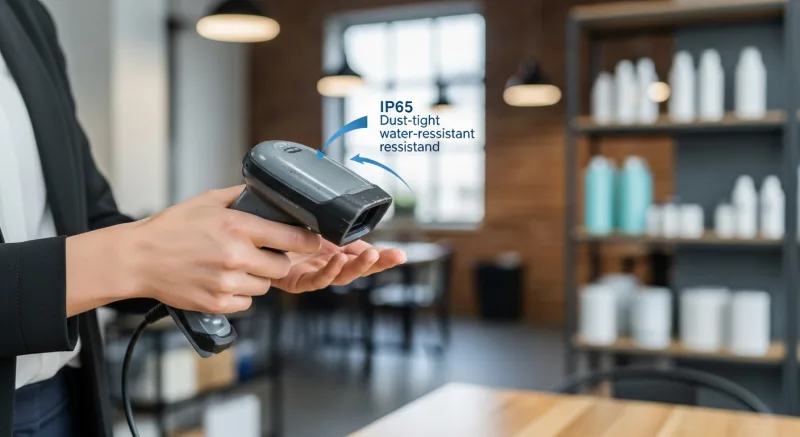
Scanner spec sheets throw around IP ratings like they're obvious. They're not. Here's what actually matters:
| IP Rating | What It Means | Good For |
|---|---|---|
| IP40 | Protected from objects >1mm. No water protection. | Dry retail, office |
| IP52 | Dust-protected. Light drips won't damage it. | General retail checkout |
| IP65 | Dust-tight. Survives water jets from any direction. | Kitchens, outdoor receiving, wet environments |
| IP67 | Dust-tight. Survives 30 minutes submerged in 1 meter of water. | Freezers, fish markets, heavy wash-down areas |
Drop ratings matter just as much. A scanner rated to survive a 6-foot drop to concrete handles the daily abuse of a busy retail floor. A scanner without a drop rating shatters the first time a cashier fumbles it. Shogun Japanese Hibachi chose drop-rated scanners for their 4 terminals specifically because the fast-paced hibachi environment means equipment gets knocked around — and they needed hardware that could take it.
The Bottom Line: 3 Rules for Buying Right
After configuring scanner setups for businesses ranging from single-register stores to Crafty Crab Seafood's 19-location, 152-terminal operation, every scanner decision comes down to three rules:
- Always buy 2D. The price difference from 1D has nearly vanished, and 2D future-proofs you for QR codes, mobile payments, digital coupons, and every barcode format that will emerge in the next 5 years.
- Match form factor to volume. Under 150 scans/hour, handheld is fine. Over 150, you need countertop presentation. Over 500, consider in-counter.
- Buy one tier above the cheapest. The $80–$100 no-name scanner from Amazon will fail within 6 months. The $150–$250 Zebra or Honeywell will last 3–5 years. The math isn't complicated.
Your barcode scanner touches every transaction in your business. It's not the place to save $80 and lose $4,500.
Need help choosing the right scanner setup for your specific POS configuration? See how KwickOS supports retail and grocery operations with open-hardware flexibility, or compare KwickOS to locked-hardware alternatives that restrict your scanner choices.
Open Hardware. Your Choice of Scanner.
KwickOS works with any USB or Bluetooth barcode scanner — no proprietary accessories required. Pair it with the processor of your choice and save $3,000–$8,000 per year on processing alone.
Get a Demo