 Rain Lee
A customer walks up to your counter. They pull out their phone, hover it over your terminal, and... nothing happens.
No tap. No beep. No payment.
"Oh, you have to insert your card," your cashier says.
The customer sighs. They dig through their wallet for a card they barely carry anymore. The chip reader takes 6 seconds. The transaction goes through. But the experience? That just cost you a return visit.
Here's the thing: 68% of in-person transactions in the US now use contactless tap-to-pay. Among customers under 35, it is over 80%. If your terminal does not accept NFC payments — or if it does but takes 5+ seconds per chip transaction — you are running a 2019 checkout in a 2026 world.
And that's not all: the terminal sitting on your counter right now is probably costing you more than the $200-$400 you paid for it. Slow transactions mean longer lines. Longer lines mean walkouts. Walkouts during a lunch rush at a restaurant doing $3,000/day in card sales? That is $150-$300 in lost revenue per day you will never see on a report.
This guide breaks down every payment terminal option available in 2026 — EMV chip readers, NFC contactless, PIN pads, smart terminals, and dual-screen devices — so you can pick the hardware that matches your business and stop bleeding invisible revenue at the checkout counter.
The 3 Types of Payment Terminals (And Which One You Actually Need)
Walk into any POS dealer showroom and you will see a wall of terminals that all look roughly the same. Black rectangles with screens, card slots, and NFC logos. But the differences between them determine your checkout speed, customer experience, and total cost of ownership over the next 5 years.
1. Traditional PIN Pads
Traditional PIN pads are the simplest payment terminals. They handle card swipe, chip insert, NFC tap, and PIN entry. That is it. No touchscreen prompts, no tip screens, no customer-facing displays. They connect to your POS via USB or Bluetooth and act purely as a card input device.
Typical cost: $150-$250
Best for: Retail stores with a separate customer-facing display, businesses that want the lowest upfront hardware cost, and setups where the POS screen handles all customer interaction.
Examples: Ingenico Lane/3000, PAX S300, Verifone P400
The tradeoff is clear. You save $100-$200 upfront, but you lose the ability to show tip prompts, loyalty sign-ups, and order confirmations directly on the payment device. For a coffee shop doing 200 transactions a day where 30 seconds of tip-screen interaction per transaction adds up to an extra hour of throughput, that is a real cost.
2. Smart Terminals
Smart terminals run their own operating system (usually Android) and include a touchscreen that can display customer-facing prompts. They handle payments, tips, signatures, loyalty enrollment, receipt selection (print vs. email vs. text), and even advertising between transactions.
Typical cost: $300-$500
Best for: Restaurants, coffee shops, any business where tip prompts and customer interaction at the terminal matter.
Examples: Pax A80, Pax A35, Verifone M440, Ingenico Axium
But it gets worse for businesses still using traditional PIN pads: smart terminals process chip transactions 40-60% faster than older models. A Pax A80 completes a chip read in 1.5-2 seconds. A 2018-era Ingenico iSC250? That is 4-6 seconds. Over 300 transactions a day, the faster terminal saves your customers 10-20 minutes of cumulative wait time.
3. Dual-Screen Terminals
Dual-screen terminals have a merchant-facing screen and a customer-facing screen in one unit. The merchant sees transaction details and controls, while the customer sees their order total, tip options, and receipt choices. No need for a separate customer-facing display.
Typical cost: $400-$700
Best for: Counter-service restaurants, bakeries, bubble tea shops — anywhere with a single checkout point where space is limited and you want both operator control and customer interaction without extra hardware.
Examples: Pax E800, Verifone M440 with dual display, Ingenico Axium DX8000
Dual-screen terminals are particularly popular with businesses like Tiger Sugar, which runs 2 self-service kiosk stations across 2 locations. The customer-facing screen handles order confirmation and contactless payment while the back screen gives staff full transaction visibility — all in one compact device.
EMV, NFC, and MSR: What Every Terminal Must Support in 2026
Every payment terminal accepts cards in up to three ways. Understanding each method tells you exactly what your terminal needs — and what you can safely ignore.
EMV Chip (Non-Negotiable)
EMV (Europay, Mastercard, Visa) chip cards generate a unique transaction code for every purchase. Unlike magnetic stripe, chip data cannot be cloned. Since the 2015 liability shift, if you process a chip card via swipe because your terminal lacks a chip reader, you are liable for any fraudulent charge. Not the bank. Not the processor. You.
Every terminal sold today includes EMV. The variable is speed. Here is where terminals diverge:
| Terminal | Chip Read Speed | Quick Chip Support |
|---|---|---|
| Pax A80 | 1.5-2 sec | Yes |
| Pax A35 | 1.5-2 sec | Yes |
| Verifone M440 | 2-3 sec | Yes |
| Ingenico Axium | 2-3 sec | Yes |
| Older models (pre-2021) | 4-6 sec | Often no |
"Quick Chip" (also called "fast EMV") lets the customer remove their card as soon as the chip is read, rather than waiting for the full authorization. This shaves 2-3 seconds off every transaction. If your terminal does not support Quick Chip in 2026, it is overdue for replacement.
NFC Contactless (Essential)
NFC (Near Field Communication) enables tap-to-pay with contactless cards, Apple Pay, Google Pay, and Samsung Pay. A customer holds their phone or card within 1-2 inches of the terminal, and the payment completes in under 1 second.
Here's the thing: NFC transactions are not just faster for the customer. They are faster for you. A tap payment processes in 0.5-1 second compared to 1.5-3 seconds for chip insert. At 300 transactions per day, that is 5-10 minutes saved — enough to serve 8-15 additional customers during peak hours.
The adoption numbers make the case impossible to ignore:
- 68% of US in-person transactions now use contactless (up from 41% in 2023)
- 82% of consumers under 35 prefer tap-to-pay
- $1.2 trillion in US contactless transaction volume in 2025
- 94% of new cards issued in 2025 include contactless capability
If your terminal has an NFC logo but contactless does not work, the issue is almost always software configuration — not hardware. Ask your processor or POS provider to verify that NFC is enabled and certified on your terminal. This is a 15-minute phone call that could be costing you sales every day it goes unresolved.
Magnetic Stripe (Legacy — Still Necessary)
Magnetic stripe (MSR) swipe is the oldest card acceptance method and the least secure. Card data is stored statically on the stripe, making it easy to clone. However, some prepaid cards, older international cards, and certain gift cards still only have a magnetic stripe. Every terminal still includes an MSR reader as a fallback. You should not need it for more than 2-5% of transactions.
Terminal Comparison: Pax vs. Ingenico vs. Verifone
Three manufacturers dominate the payment terminal market. Each has strengths, trade-offs, and ideal use cases.
Pax Technology
Pax has surged in market share over the past three years, particularly among independent restaurants and retail businesses. Their Android-based terminals offer fast chip processing, responsive touchscreens, and competitive pricing.
Pax A80: The workhorse. 4-inch touchscreen, EMV + NFC + MSR, built-in printer, Ethernet and WiFi, Android 10. Processes chip in under 2 seconds. This is the terminal we see most often across the 5,000+ businesses running KwickOS — and for good reason. It is fast, reliable, and costs $300-$350.
Pax A35: The compact option. 3.5-inch touchscreen, same payment capabilities as the A80, but smaller footprint and no built-in printer. Ideal for kiosk setups, tableside payment, or businesses where a separate receipt printer is already in place. Baked Cravings uses the Pax A35 in their self-serve kiosk at Lego Land — it handles 24-hour retail payment in a compact, durable form factor. Cost: $200-$250.
Pax E800: The dual-screen powerhouse. 8-inch merchant display + 4-inch customer-facing screen. Runs full Android with enough processing power to handle POS software directly on the terminal. Best for counter-service environments that want an all-in-one device. Cost: $500-$650.
Ingenico (Now Part of Worldline)
Ingenico has been in the payment terminal business for decades and has a massive installed base. Their newer Axium line is Android-based and competitive with Pax on features, though typically priced 10-20% higher.
Ingenico Axium D7: 7-inch touchscreen, EMV + NFC + MSR, WiFi and 4G LTE, built-in camera for QR payments. A premium smart terminal aimed at businesses that want maximum flexibility. Cost: $400-$500.
Ingenico Lane/3000: A traditional countertop PIN pad with chip, NFC, and a small color display. No touchscreen, no Android OS. Simple, reliable, and appropriate for high-volume retail where the POS handles all customer interaction. Cost: $200-$280.
And that's not all: Ingenico's older models (iCT220, iSC250, iPP350) are still in widespread use but are reaching end-of-life. If you are running any terminal with an "i" prefix, it is time to upgrade. These models have slower chip processing, limited NFC support, and are approaching PCI certification expiration.
Verifone
Verifone is the largest terminal manufacturer globally. Their newer M-series (M440, M400) competes directly with Pax's smart terminals, while their legacy VX line is being phased out.
Verifone M440: 4.3-inch touchscreen, Android-based, EMV + NFC + MSR, optional customer-facing display attachment. Well-built and widely supported by processors. Cost: $350-$450.
Verifone P400: A compact PIN pad with a 3.5-inch color screen, chip, NFC, and PIN support. Good value for businesses that need a simple, reliable terminal without smart features. Cost: $180-$250.
The Hidden Cost: Processor Lock-In Through Terminals
Here is the part most business owners miss — and it is the most expensive mistake in the entire terminal buying process.
Some POS systems require you to use their branded terminals. Toast ships a proprietary terminal that only works with Toast Payments at 2.99% + $0.15 per transaction. Square's terminal only processes through Square at 2.6% + $0.10. You cannot take these terminals to another processor even if you find a rate 0.5% lower.
On $40,000/month in card volume, that 0.5% processor lock-in costs you $2,400/year — more than the price of a new terminal every single year.
Compare that to a processor-agnostic setup. With KwickOS, you buy a standard Pax A80 for $300, connect it to whichever processor gives you the best rate, and switch processors whenever you find a better deal. The terminal stays. The savings compound. Over a 3-year period, processor freedom on a $40K/month business saves $7,200 to $14,400 compared to a locked system — and you get to keep using the same hardware.
This is exactly how T. Jin China Diner operates across 15 locations with 75 terminals. Each terminal is processor-agnostic, meaning the entire chain can negotiate volume-based interchange-plus rates and switch processors without touching a single piece of hardware. At their transaction volume, processor freedom saves tens of thousands per year.
Want to see the real math for your business? Use our processing fee calculator to compare locked vs. agnostic terminal costs.
How to Choose the Right Terminal for Your Business Type
Stop overthinking this. Your business type determines your terminal. Here is the decision matrix:
| Business Type | Recommended Terminal | Why | Cost |
|---|---|---|---|
| Full-service restaurant | Pax A80 | Tip screen, fast NFC, built-in printer, tableside-ready | $300-$350 |
| Quick-service / coffee shop | Pax A35 or Pax A80 | Speed is everything at high volume; compact fits tight counters | $200-$350 |
| Retail store | Verifone P400 or Pax A35 | Simple PIN pad if POS has customer display; smart if not | $180-$250 |
| Nail salon / spa | Pax A80 | Tip percentage prompts, receipt email option, commission tracking | $300-$350 |
| Self-service kiosk | Pax A35 | Compact, no printer needed, pairs with kiosk display | $200-$250 |
| Multi-location chain | Pax A80 (standardize) | Uniform hardware simplifies training, support, and procurement | $300-$350 × locations |
| Counter-service with limited space | Pax E800 | Dual screen eliminates need for separate customer display | $500-$650 |
Crafty Crab Seafood standardized on the Pax A80 across all 19 locations and 152 terminals. One terminal model means one training process, one set of spare parts, and one support playbook. When a terminal fails (and terminals do fail in restaurant environments), a replacement is pre-configured and ready to swap in under 5 minutes.
5 Terminal Features Most Businesses Overlook
The card reader gets all the attention. But these five features separate a terminal that works from a terminal that works well:
- Connectivity fallback. Your terminal should support both WiFi and Ethernet (or WiFi and 4G). When your internet drops during a Friday night rush, a terminal with only WiFi connectivity becomes a paperweight. KwickOS's hybrid local+cloud architecture processes payments at 1ms local latency and continues working offline — but the terminal still needs a physical connection path to function. Ethernet is the reliable choice for fixed terminals. WiFi is acceptable for tableside devices with a strong access point.
- Tip screen customization. The default tip percentages on most terminals are 15%, 18%, and 20%. For a restaurant with $35 average tickets, moving those defaults to 18%, 20%, and 25% increases average tips by $0.70-$1.40 per transaction. Over 200 transactions per day, that is $140-$280/day in additional tips for your staff — from a 2-minute configuration change.
- Receipt delivery options. A terminal that only prints paper receipts costs you $0.02-$0.04 per receipt in paper and wear. A smart terminal that offers print, email, or text receipt reduces paper costs by 40-60% and captures customer contact information for your CRM and loyalty program. That email address is worth far more than $0.03 in paper savings.
- PCI PTS certification version. Payment terminals must meet PCI PTS (PIN Transaction Security) standards. Terminals certified under PCI PTS 4.x are reaching end-of-life in 2026-2027. If your terminal's PCI certification is about to expire, your processor may refuse to support it. Check with your processor and aim for PCI PTS 5.x or 6.x certified terminals.
- Durability rating. Restaurant terminals endure grease, heat, liquid spills, and the occasional drop. Shogun Japanese Hibachi learned this first-hand — their hibachi stations produce enough airborne grease to degrade unprotected electronics within months. Look for terminals with IP54 or higher ratings (dust and splash protection) and operating temperature ranges up to 50°C / 122°F for kitchen-adjacent placements.
When to Replace Your Current Terminal
You do not need to replace a working terminal every year. But you are overdue if any of these apply:
- Chip transactions take more than 4 seconds. Modern terminals complete chip reads in under 2 seconds. If yours takes 4+, you are losing 10-15 minutes of cumulative customer time per day.
- No NFC / contactless support. You are turning away 68% of preferred payment methods. This is not a future concern — it is happening today at your counter.
- No Quick Chip support. Customers should be able to remove their card immediately after the chip reads, not wait for the full authorization cycle. Quick Chip is standard on every terminal manufactured after 2020.
- PCI PTS 4.x or older certification. Check the sticker on the back of your terminal or ask your processor. PTS 4.x devices will lose support between 2026 and 2028.
- No receipt email/text option. If your terminal only prints paper receipts, you are missing every opportunity to capture customer contact information at the point of payment.
- The terminal is processor-locked. If you cannot switch processors without replacing the terminal, you are paying a locked-in rate that could be 0.3%-0.8% higher than the market. On $40,000/month in volume, that is $1,440 to $3,840/year in overpayment. See our POS comparison pages to understand the real cost of processor lock-in.
Installation and Setup: What to Expect
A modern payment terminal should be operational within 30-60 minutes of unboxing. Here is the typical setup process:
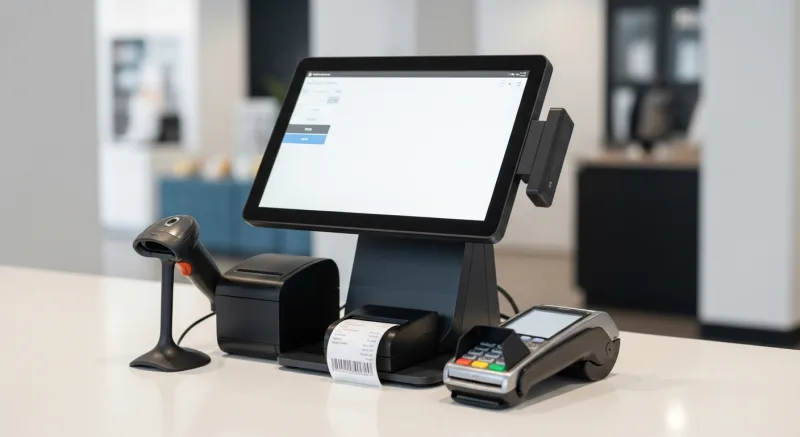
- Physical connection. Plug in power and Ethernet (or configure WiFi). Mount the terminal on a stand or countertop bracket.
- Processor configuration. Your payment processor provides a TID (Terminal ID) and MID (Merchant ID) that link the terminal to your account. On a Pax terminal, this is entered during initial setup or pushed remotely by your processor.
- POS integration. Connect the terminal to your POS system via USB, Ethernet, or cloud API. KwickOS auto-detects Pax terminals on the same network and pairs in under 60 seconds.
- Test transactions. Run a $1.00 test charge and void to confirm chip, NFC, and tip screen functionality.
- Tip and receipt configuration. Set your preferred tip percentages, receipt delivery options, and any customer-facing branding or messaging.
For multi-location deployments like Rockin' Rolls (3 stores, 49 iPad self-ordering stations with integrated payment), the key is standardizing your terminal model and pre-configuring devices before shipping them to each location. A pre-configured terminal needs only steps 1 and 4 on-site — a 15-minute job for any staff member.
The Bottom Line
Your payment terminal is not a commodity. The difference between a $200 terminal that takes 6 seconds per chip read and a $300 terminal that completes in 1.5 seconds is not $100 — it is thousands of dollars in throughput, customer experience, and processor freedom over the life of the device.
Here is the decision, simplified:
- If your terminal is more than 4 years old: Replace it. The speed, NFC support, and PCI compliance improvements alone justify the cost.
- If your terminal is processor-locked: Switch to a processor-agnostic POS and a standard terminal. The processing savings will pay for the new hardware in 2-3 months.
- If you are opening a new location: Standardize on one terminal model (we recommend the Pax A80) and buy from a processor-agnostic POS provider so you never get locked in.
The terminal on your counter is the last thing between your customer and their money entering your business. Make it fast. Make it modern. Make it yours to keep — regardless of which processor is giving you the best rate.
Find the Right Terminal for Your Business
KwickOS works with any payment terminal and any processor. No lock-in. No proprietary hardware. See how it works.
Get a Free Demo