Bars are the most operationally complex small businesses in America. They handle cash and alcohol — the two most theft-prone items in any business. They operate at night, when supervision is minimal. They employ workers who have physical access to thousands of dollars in inventory behind the bar. And they run on a tab system that creates dozens of open transactions simultaneously, each one an opportunity for error or fraud. A POS handles the transaction. An operating system handles the entire operation: security, inventory, tabs, scheduling, loyalty, reporting, and accountability.
The bar industry loses more money to internal shrinkage than any other hospitality segment. Industry estimates range from $10,000-25,000 per bar per year in unaccounted liquor. The problem is not that bar owners do not care — it is that their POS systems literally cannot track the variance. They know what was rung up. They do not know what was poured. An operating system closes that gap.
What a Bar Operating System Does (That a POS Cannot)
1. Fingerprint-Authenticated Tab Management
Every bar operation starts with opening tabs and ends with closing them. The critical question is: who opened this tab, who added items to it, and who comped or discounted items on it? With a 4-digit PIN (the standard on Toast and Square), any bartender who has seen a colleague enter their code can access that person's account. PINs are shared, forgotten, and compromised constantly in bar environments.
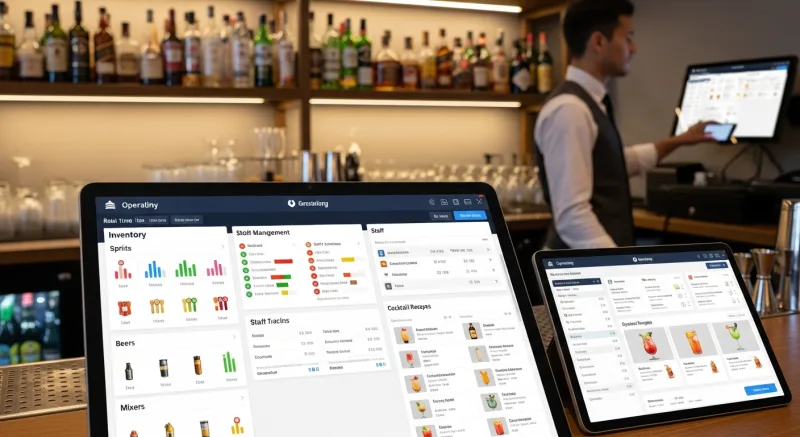
KwickOS supports 1:N fingerprint authentication. Every tab action — open, add item, void, comp, discount, close — is authenticated by the bartender's fingerprint. There is no PIN to share. When the end-of-shift report shows 12 comps, each one is tied to a specific fingerprint with a timestamp. The owner knows exactly who comped what, when, and can review whether each was justified. Toast does not support fingerprint authentication. Square does not support it. This is a fundamental security gap that only an OS-level platform addresses.
2. Liquor Inventory and Pour Cost Tracking
A bar's profitability lives and dies on pour cost — the ratio of liquor cost to liquor revenue. Industry standard is 18-24%. Bars running above 25% are losing money on every drink. An operating system tracks theoretical pour cost (based on recipes and sales data) versus actual pour cost (based on inventory counts) and identifies the variance in real time.
If the system shows 200 vodka drinks sold but the inventory count indicates 240 drinks worth of vodka consumed, the 40-drink variance ($280-400 at retail pricing) is visible immediately — not discovered during a monthly inventory audit when the evidence is cold and the responsible bartender may have already moved on.
3. Integrated Loyalty and Tab History
When a regular opens a tab, the OS displays their loyalty status, point balance, and tab history — including their average spend, favorite drinks, and whether they tipped well last time. This data helps bartenders personalize service ("The usual Maker's Mark Old Fashioned, Mike?") and identify high-value customers who deserve VIP treatment. A POS processes the tab. An OS manages the relationship. Our bar loyalty guide covers the specific program configurations in detail.
4. Employee Scheduling for Bar Operations
Bar scheduling is uniquely challenging: split shifts (setup crew at 3 PM, service at 5 PM), late-night hours that cross midnight (creating wage calculation complexity), varying demand by day of week (Tuesday needs 2 bartenders, Saturday needs 6), and event-based staffing (game nights, live music, holiday parties). An integrated scheduling module calculates labor cost as a percentage of projected revenue — so the owner can see that Saturday's schedule is costing 22% of forecasted revenue (healthy) or 35% (overstaffed).
5. Digital Signage for Promotions and Menus
Bar menus change constantly: rotating craft taps, seasonal cocktails, daily specials, happy hour pricing. Printed menus are outdated by Wednesday. KwickSign displays the current menu on screens throughout the bar, updating automatically when the POS menu changes. When a keg blows, the bartender marks it empty in the system and it disappears from every screen — no more customers ordering a beer that is unavailable.
6. Online Ordering for Food and Takeout Cocktails
Since many states legalized cocktails-to-go during 2020-2021 (and many have since made it permanent), bars have a new revenue channel: takeout cocktail kits and food orders. KwickMenu integrates this into the same system that manages dine-in tabs, so the kitchen sees all orders on one KDS regardless of source.
7. Delivery at Flat Rate
For bars that offer food delivery or cocktail kit delivery, KwickDriver at $2 flat + $6.99/5mi keeps delivery profitable. Third-party delivery apps charge 15-25% commission — on a $30 food order, that is $4.50-7.50 per delivery. The math on third-party delivery does not work for bar food margins. KwickDriver makes it viable.
The Security Argument: Why Bars Need OS-Level Controls
Bar theft is the most persistent and underreported problem in the hospitality industry. The Beverage Information Group estimates that bars lose 20-25% of revenue to some form of shrinkage. The most common methods:
- Over-pouring: Bartender pours 2oz instead of 1.5oz — 33% more liquor, zero additional revenue. Over a full shift, this adds up to 1-2 bottles of lost product.
- Unauthorized comps: Bartender comps drinks for friends, dates, or to inflate tips. Without fingerprint tracking, comps are attributed to a general "manager" code.
- Short-ringing: Bartender rings a well drink but pours a call — charges $8 but gives away $12 worth of product. The $4 difference goes undetected unless inventory variance is tracked.
- Buddy punching: One employee clocks in for another who has not arrived yet. At $15/hour, 30 minutes of buddy punching per day costs $2,740/year per employee.
An operating system with fingerprint authentication, real-time inventory tracking, and comp/void reporting addresses every one of these. The fingerprint ensures the right person is behind the bar. The inventory tracking identifies pour variance. The comp reporting shows who is giving away product. The time clock with biometric verification eliminates buddy punching.
Cost Comparison: POS Patchwork vs. Bar Operating System
| Capability | Toast/Square + Add-ons | KwickOS |
|---|---|---|
| POS & Tab Management | $69-79/month | Included |
| Loyalty Program | $75/month | Included |
| Inventory/Pour Cost | $99-199/month (BevSpot, etc.) | Included |
| Fingerprint Auth | Not available | Native 1:N/1:1 |
| Digital Signage | $25-50/month | KwickSign included |
| Scheduling | $30-50/month | Included |
| Processor Choice | Locked to vendor | Any processor |
| Total | $298-453/month | One unified price |
Offline Mode: When the Internet Drops at Midnight
Cloud-only POS systems fail at the worst possible moment for bars: Saturday night at midnight, when the internet drops due to overloaded ISP infrastructure. The bar is packed, tabs are open, and the POS cannot process payments. With Toast, the bartender is writing orders on napkins. With Square, the register shows a spinning wheel.
KwickOS's hybrid local+cloud architecture keeps every function running locally. Tabs stay open, payments process, loyalty points accrue, and the KDS keeps displaying kitchen orders — all at 1ms local latency. When connectivity returns, the data syncs silently. The bar never misses a transaction, and customers never know there was an issue.
Multi-Language Support for Diverse Bar Teams
Bars in major metros employ diverse teams who speak multiple languages. KwickOS supports English, Chinese, and Spanish natively — the three most common languages in US hospitality. When a new bartender whose primary language is Spanish logs in, the interface displays in Spanish. The kitchen staff working in Chinese sees Chinese on the KDS. The manager reviewing reports sees English. This is not a translated overlay — it is built into the OS at every level.
Implementation: How Bars Switch Without Losing a Night of Revenue
Day 1: KwickOS installation during daytime hours (when the bar is closed). Hardware setup, menu import, and employee enrollment (including fingerprint registration) typically complete in 2-3 hours.
Day 2: Staff training during afternoon pre-shift. The web-based interface requires 1-2 hours of training for bartenders. Focus areas: opening/closing tabs, applying loyalty discounts, processing payments, and fingerprint authentication for voids and comps.
Day 3: Go live. Run the first night with the new system. Have the installer available by phone for any questions. Most bars report a fully smooth operation by the second night.
Week 2: Fine-tune inventory par levels, configure loyalty program, and activate digital signage. The core POS functions are operational from day 1; the OS features are layered in as the owner becomes comfortable with the system.
The key advantage: KwickOS runs on standard hardware. If the bar already has tablets, monitors, or receipt printers, they likely work with the system. There is no proprietary hardware requirement — unlike Toast, which mandates Toast-branded terminals at $500-900 each.
Stop the $18,000/Year Leak
KwickOS gives bars fingerprint security, pour cost tracking, loyalty, scheduling, and signage in one platform. See how an operating system catches what a POS misses.
Book Your Free Demo